



Skip to content
View in the app

A better way to browse. Learn more.

iniBuilds Forum

A full-screen app on your home screen with push notifications, badges and more.

To install this app on iOS and iPadOS
  1. Tap the Share icon in Safari
  2. Scroll the menu and tap Add to Home Screen.
  3. Tap Add in the top-right corner.
To install this app on Android
  1. Tap the 3-dot menu (⋮) in the top-right corner of the browser.
  2. Tap Add to Home screen or Install app.
  3. Confirm by tapping Install.

ShermheadRyder

Member
  • Joined

  • Last visited

Everything posted by ShermheadRyder

  1. Apologies for the false report, that makes sense - thanks a lot, appreciate it!
  2. Apologies, forgot to include that in my original post - it was Navigraph data.
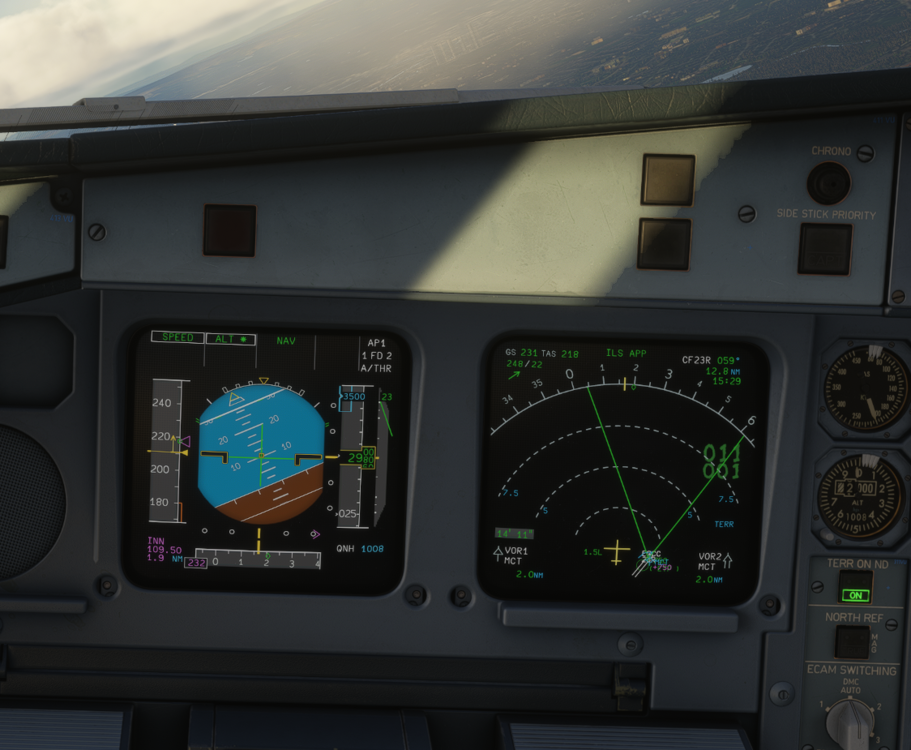
  3. Hi, I've seen an issue with lateral navigation on a missed approach, for example ILS 23R at EGCC. The missed approach is straight ahead to 750' or D0.3 MCT, whichever is later, then right right to track 356. However as you can see from the screenshot, the plane turns much further to the right than track 356. It appears to me as though the plane is computing the 356 track from the runway threshold (or similar) meaning it needs to turn far further right than track 356 in order to "capture" this path.
Account

Navigation

Configure browser push notifications

Chrome (Android)
  1. Tap the lock icon next to the address bar.
  2. Tap Permissions → Notifications.
  3. Adjust your preference.
Chrome (Desktop)
  1. Click the padlock icon in the address bar.
  2. Select Site settings.
  3. Find Notifications and adjust your preference.