



Skip to content
View in the app

A better way to browse. Learn more.

iniBuilds Forum

A full-screen app on your home screen with push notifications, badges and more.

To install this app on iOS and iPadOS
  1. Tap the Share icon in Safari
  2. Scroll the menu and tap Add to Home Screen.
  3. Tap Add in the top-right corner.
To install this app on Android
  1. Tap the 3-dot menu (⋮) in the top-right corner of the browser.
  2. Tap Add to Home screen or Install app.
  3. Confirm by tapping Install.

jdk1995

Member
  • Joined

  • Last visited

Everything posted by jdk1995

  1. Unfortunately, this did not solve the problem.
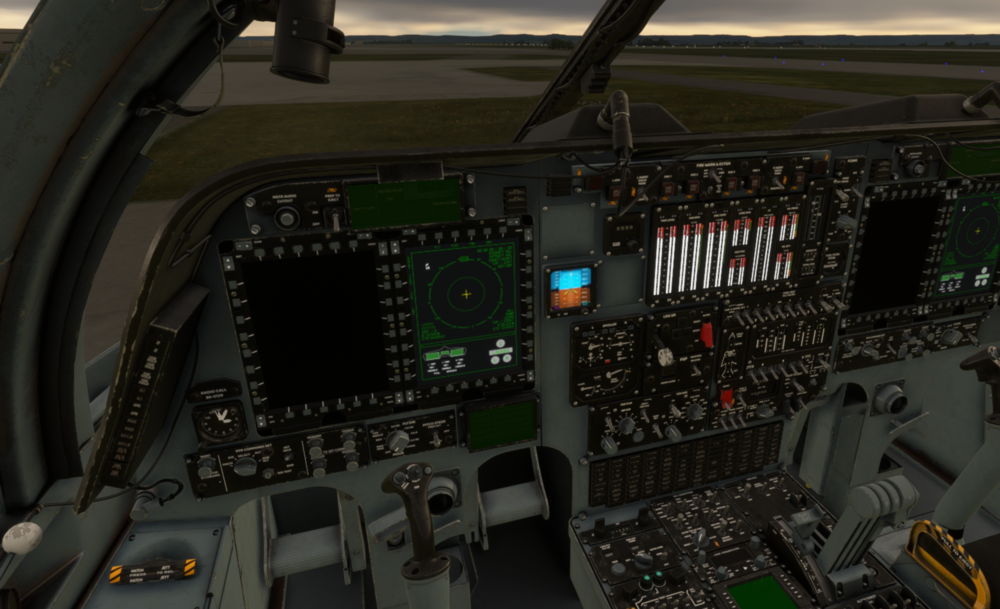
  2. With the newest v1.0.1 installed when I load into the sim for a flight both on the ramp or ready to takeoff on the runway the Navigation Systems Display appears powered on but no buttons will interact with the screen. Once the APUs are started none of the other screens power up and the plane is unflyable. The engine display panel also appears to be powered on while none of the engines are running.
Account

Navigation

Configure browser push notifications

Chrome (Android)
  1. Tap the lock icon next to the address bar.
  2. Tap Permissions → Notifications.
  3. Adjust your preference.
Chrome (Desktop)
  1. Click the padlock icon in the address bar.
  2. Select Site settings.
  3. Find Notifications and adjust your preference.