Obiter
Member
-
Joined
-
Last visited
Everything posted by Obiter
-
ROUTING: KDEN/34L HHOTH2 JOBBA DCT KD78Y DCT KP87A DCT KP09E DCT 4930N09000W 5230N08000W 55N070W DCT YDP DCT AVUTI DCT 59N050W 5930N04000W 5930N03000W 59N020W DCT GOMUP DCT GINGA DCT GOW DCT TLA N97 NATEB M981 GODOS DCT DODEN DCT TABUM DCT HAREM T104 ROKIL ROKIL1A EDDM/08L I can also attached the PDF of my OFP if you'd like.
-
WASIM crashed while swapping SEC to ACTIVE. Information: Aircraft: A350-900 (v1.06) Simulator: FS20 Navdata: NAVIGRAPH WASIM Error(s): WASM: Exception c0000005 in gauge MFD in module vfs://inibuilds-aircraft-a350/SimObjects/Airplanes/inibuilds-aircraft-a350-900/panel/inibuilds-A350.wasm PC Specs: i9-14900K, RTX 3070, 32GB RAM
-
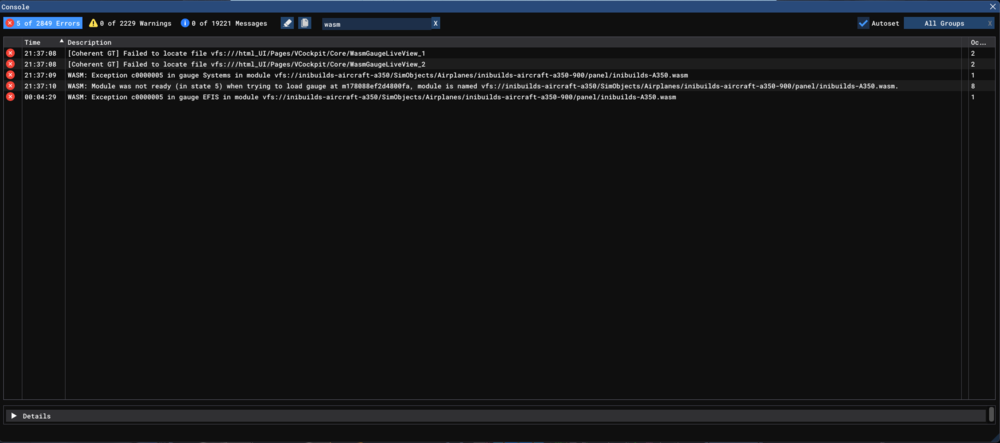
WASIM crashed while entering FIX INFO and accidentially switched camera views by using NUM PAD instead of NUM KEYS. Information: Aircraft: A350-900 Simulator: FS20 Navdata: NAVIGRAPH WASIM Error(s): WASM: Exception c0000005 in gauge Systems in module vfs://inibuilds-aircraft-a350/SimObjects/Airplanes/inibuilds-aircraft-a350-900/panel/inibuilds-A350.wasm WASM: Module was not ready (in state 5) when trying to load gauge at m178088ef2d4800fa, module is named vfs://inibuilds-aircraft-a350/SimObjects/Airplanes/inibuilds-aircraft-a350-900/panel/inibuilds-A350.wasm. WASM: Exception c0000005 in gauge EFIS in module vfs://inibuilds-aircraft-a350/SimObjects/Airplanes/inibuilds-aircraft-a350-900/panel/inibuilds-A350.wasm PC Specs: i9-14900K, RTX 3070 8GB VRAM, 32GB DDR5 RAM