




sauqydr
Member
-
Joined
-
Last visited
-
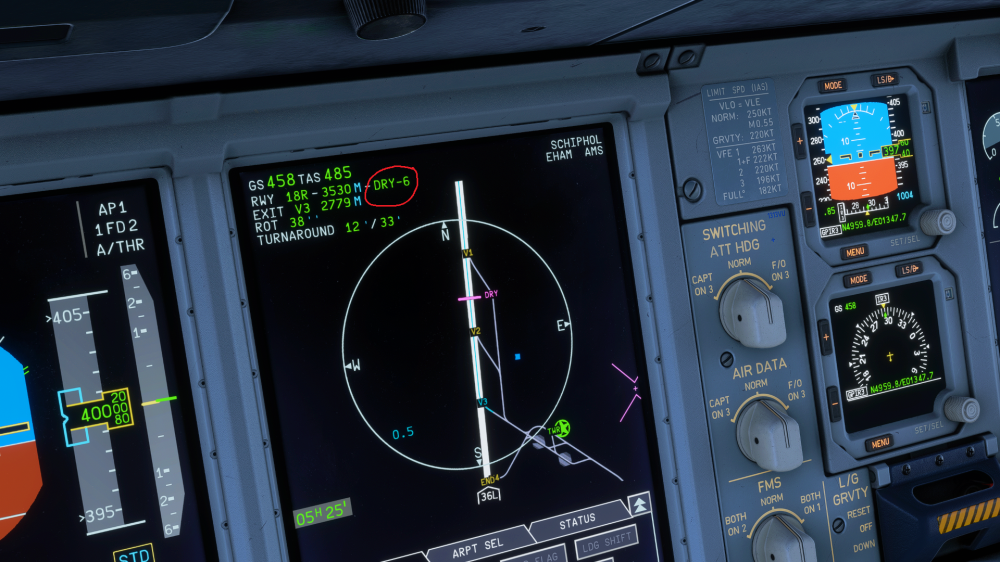
Hello, I Believe that this runway condition entry i've circled on the screenshot should not exist on the A380. Correct me if i'm wrong but isn't it supposed to be available on the ROPS Version 2 in which the aircraft has the runway condition selector knob (such as A350)? Thank you!
-
Roger, Done.
-
Aircraft: A350-900 Simulator: FS2024 Navdata Method: NAVIGRAPH OFP: PFD Attached WASM Error: WASM: Error during HUD_gauge_update execution. Error code : 0xc000001d WASM: Module vfs://inibuilds-aircraft-a350/SimObjects/Airplanes/A350/attachments/inibuilds/Function_Interior_A350/panel/inibuilds-A350.wasm is now dirty Specs: i7 14700f, RTX 5080, 16gb DDR4 RAM Autosave File: N/A I was trying to reload the approach ILS 04L into EKCH as after few vectors from the ATC, it doesn't say the arrival/approach type on top of the ND. Then the crash happened once i clicked on ILS04L on the arrivals page. WSSSEKCH_PDF_1779843119.8e8108bd.pdf
.thumb.png.63d2790822deed26c590b1b3a99cc7eb.png)
.thumb.png.e34147fb76f632a230a0a76864cf7792.png)
-
Aircraft: A350-900 Simulator: FS2024 Navdata Method: NAVIGRAPH OFP: PFD Attached WASM Error: WASM: Error during HUD_gauge_update execution. Error code : 0xc000001d WASM: Module vfs://inibuilds-aircraft-a350/SimObjects/Airplanes/A350/attachments/inibuilds/Function_Interior_A350/panel/inibuilds-A350.wasm is now dirty Specs: i7 14700f, RTX 5080, 16gb DDR4 RAM Autosave File: N/A I was trying to reload the approach ILS 04L into EKCH as after few vectors from the ATC, it doesn't say the arrival/approach type on top of the ND. Then the crash happened once i clicked on ILS04L on the arrivals page. WSSSEKCH_PDF_1779843119.8e8108bd.pdf
.thumb.png.5364d94a35f4b988c03acb916e0cde7b.png)
.thumb.png.65c5107d37fbc404d0c589f82d8de0a0.png)


.png.9ea5168fc7bac67b1d28a450fd61fe76.png)
.png.2c0f3dd5b428e2cd8fca85a3262f67de.png)
.png.e4cbb1d1838feacad169ae4473312961.png)
.png.1a04229cc064b219153217fdc06a7ac4.png)