




mustard7627
Member
-
Joined
-
Last visited
Everything posted by mustard7627
-
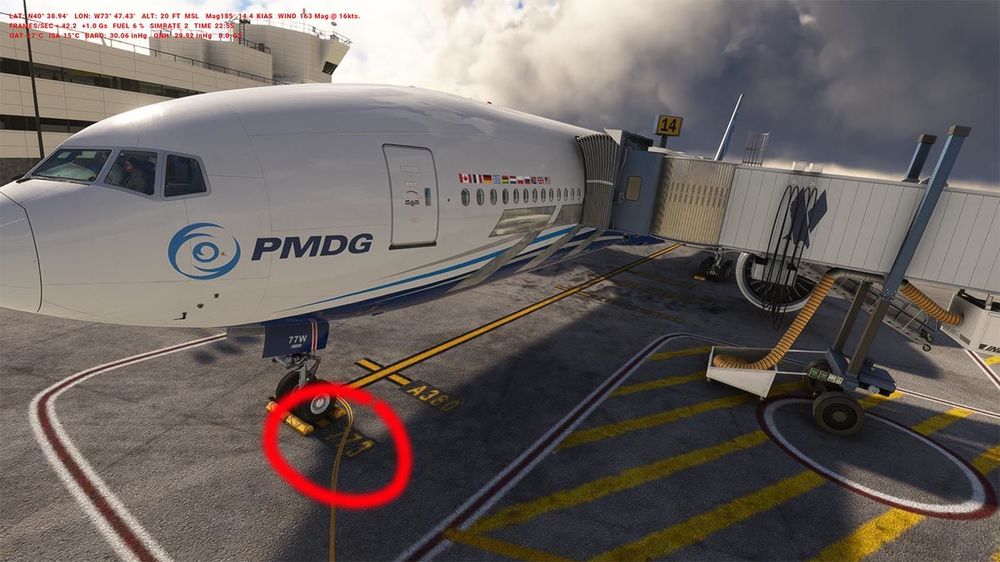
[Solved] Ok i found the solution. By default the B777 is too far, his nose is in the wall of the front building. The first time i repositionned it on the wrong position (747-764-A359) for B747-B767-400-A350-900. But it was a wrong place. I just repositioned it on the mark "773" for B777-300 ... and after that the gateway was good. So it's solve. Nevertheless, if the position is wrong why the gateway doesn't move to the door ?
-
I checked with the Asobo B787, it's good. So it's not a problem of maximum extention of the gateway. It can reach all door. I cheked with B737-900ER of PMDG, the door is also offset with the door. I can't check the other B737-600/700/800 because i don't have them.

-
B777-300ER by PMDG (See the attached pic) Also, by default, the aircraft is positioned too far forward, with the cockpit in the wall. But with GSX I was able to move it back correctly. Nevertheless GSX doesn't let you adjust the positions in and out of the gateway. On the pic I think the gateway is fully extended, too short to the door. The gate B14 is the new gate used recently by British Airways. Thanks for your response

-
Bug report: On the Gate B14 of the Terminal 8, the gateway extends to its maximum but does not reach the door of aircraft and stops at around 10 feets. the aircraft is well on his yellow line


