



Skip to content
View in the app

A better way to browse. Learn more.

iniBuilds Forum

A full-screen app on your home screen with push notifications, badges and more.

To install this app on iOS and iPadOS
  1. Tap the Share icon in Safari
  2. Scroll the menu and tap Add to Home Screen.
  3. Tap Add in the top-right corner.
To install this app on Android
  1. Tap the 3-dot menu (⋮) in the top-right corner of the browser.
  2. Tap Add to Home screen or Install app.
  3. Confirm by tapping Install.

Real1Doge

Member
  • Joined

  • Last visited

  1. Hi, I'm having trouble trying to import flight plans into the FMS using the F-PLN Request function in the INIT page. After pressing the button, it becomes "REQUEST PENDING" for a few seconds before reverting back to "CPNY F-PLN REQUEST", indicating that the flight plan was not fetched. The OIS's FLT OPS STS & Loadsheet works perfectly fetching data from SimBrief but not the FMS. Also note that this doesn't happen all the time but still happens most of the time. The FMS manages to request the flight plan successfully occasionally although I did not change anything. This seems to randomly happen.
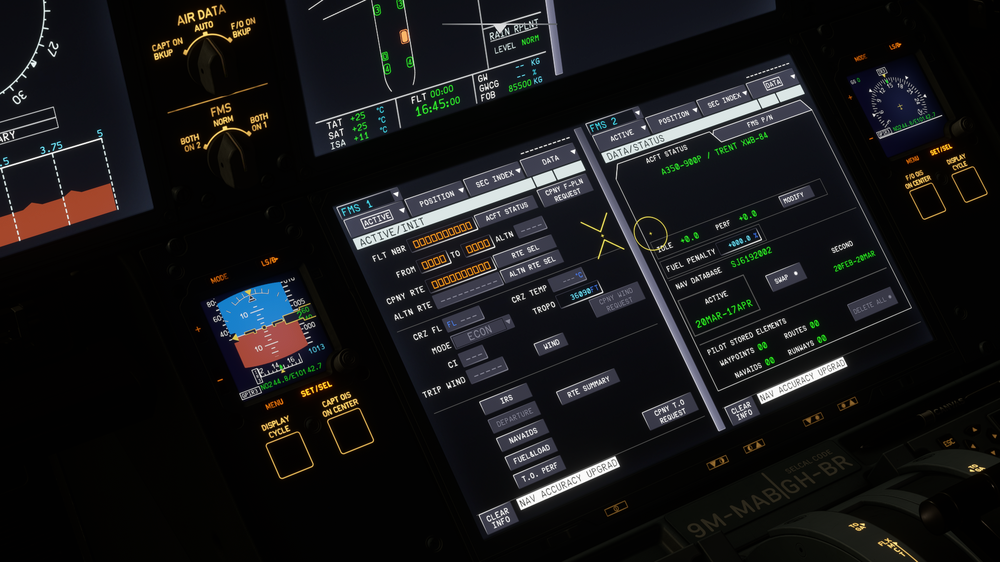
  2. Hi, I'm still facing this issue most of the time (It works occasionally for some reason). Detailed Navlog is already on by default for me but I still can't get it to work. Any solutions?

Account

Navigation

Configure browser push notifications

Chrome (Android)
  1. Tap the lock icon next to the address bar.
  2. Tap Permissions → Notifications.
  3. Adjust your preference.
Chrome (Desktop)
  1. Click the padlock icon in the address bar.
  2. Select Site settings.
  3. Find Notifications and adjust your preference.