



Skip to content
View in the app

A better way to browse. Learn more.

iniBuilds Forum

A full-screen app on your home screen with push notifications, badges and more.

To install this app on iOS and iPadOS
  1. Tap the Share icon in Safari
  2. Scroll the menu and tap Add to Home Screen.
  3. Tap Add in the top-right corner.
To install this app on Android
  1. Tap the 3-dot menu (⋮) in the top-right corner of the browser.
  2. Tap Add to Home screen or Install app.
  3. Confirm by tapping Install.

Andreas Bergsten

Member
  • Joined

  • Last visited

Everything posted by Andreas Bergsten

  1. If anyone else have this problem you can try this. Before you read. I am on Xbox. This solution may not translate to PC. When trying to load my flight plan in to the EFB, the EFB says that I need to enter my pilot ID (even though I have done it). When spawning in Sweden the EFB settings are on metric. In SimBreif I have feet. I changed to imperial on the EFB and then it loaded in the flight plan just fine. Seems you have to have the same measurement systems in the A320 neo v2 EFB settings and SimBreif to make it work.
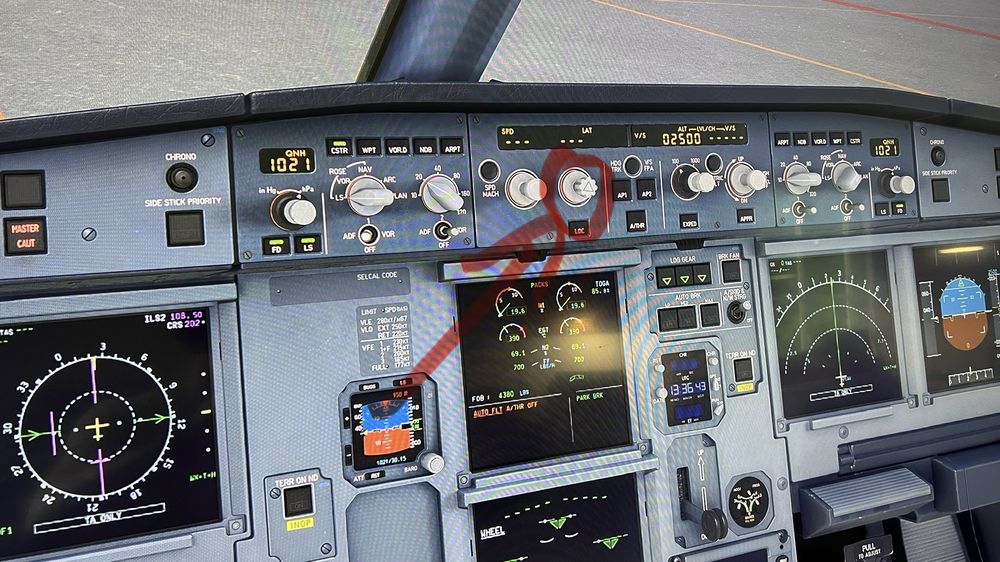
  2. Hi! On Xbox. On autopilot. After engaging Manual mode (heading), managed mode (nav) will not re-engage. Pic is just for showing the button. I know i am on the ground.
Account

Navigation

Configure browser push notifications

Chrome (Android)
  1. Tap the lock icon next to the address bar.
  2. Tap Permissions → Notifications.
  3. Adjust your preference.
Chrome (Desktop)
  1. Click the padlock icon in the address bar.
  2. Select Site settings.
  3. Find Notifications and adjust your preference.