



Skip to content
View in the app

A better way to browse. Learn more.

iniBuilds Forum

A full-screen app on your home screen with push notifications, badges and more.

To install this app on iOS and iPadOS
  1. Tap the Share icon in Safari
  2. Scroll the menu and tap Add to Home Screen.
  3. Tap Add in the top-right corner.
To install this app on Android
  1. Tap the 3-dot menu (⋮) in the top-right corner of the browser.
  2. Tap Add to Home screen or Install app.
  3. Confirm by tapping Install.

JNAS308

Member
  • Joined

  • Last visited

Everything posted by JNAS308

  1. yea, but before the Update i had do much more input at the Sidestick to disable the AP, and now just a little touch will disable it. thats annoying when you fly on Vatsim. i have the Push to talk button on the Sidestick.
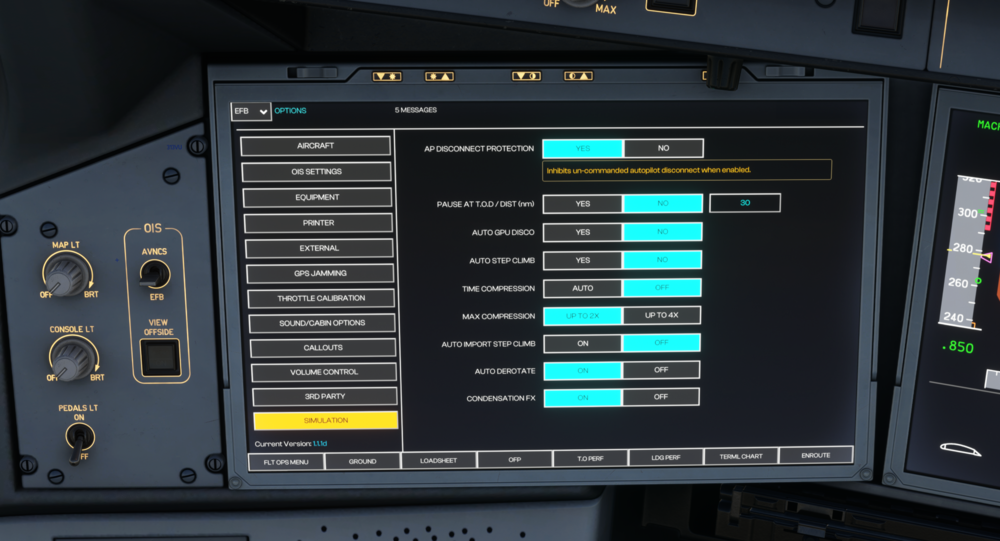
  2. hi there, i have the issue with the Airbus TCA sidestick, every time, whe i only touch or move a bit the sidestick the Autopilot disconnect and needs 5 or more klicks to get the AP on. I have in the Options the AP Disconnect Protection on and it dosent work correctly. i hope anybody kan help to solve that Problem few details A350 v1.1.1 MSFS 2020 AIrbus TCA Captains Pack
Account

Navigation

Configure browser push notifications

Chrome (Android)
  1. Tap the lock icon next to the address bar.
  2. Tap Permissions → Notifications.
  3. Adjust your preference.
Chrome (Desktop)
  1. Click the padlock icon in the address bar.
  2. Select Site settings.
  3. Find Notifications and adjust your preference.