



Skip to content
View in the app

A better way to browse. Learn more.

iniBuilds Forum

A full-screen app on your home screen with push notifications, badges and more.

To install this app on iOS and iPadOS
  1. Tap the Share icon in Safari
  2. Scroll the menu and tap Add to Home Screen.
  3. Tap Add in the top-right corner.
To install this app on Android
  1. Tap the 3-dot menu (⋮) in the top-right corner of the browser.
  2. Tap Add to Home screen or Install app.
  3. Confirm by tapping Install.

dream

Member
  • Joined

  • Last visited

Everything posted by dream

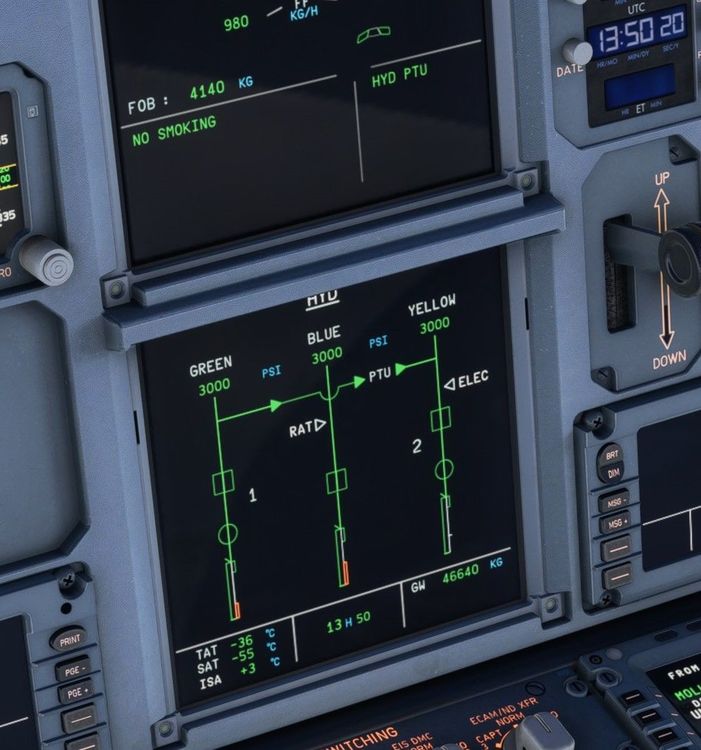
  1. Hi, I have a problem, inflight PTU always running, can you help me?
  2. dream posted a topic in Systems
    Good day, I am using a lot this aircraft, if it will help for getting better I'd like report something happened to me in some flight. Instrument freezing during long flight maybe when I did a direct to. Unable to stop APU. PTU always running. There is not the autobrake indication in fma, NEO real feature. There is not the indication fo cooling engine before start, NEO real feature. Missing some ILS frequency. Will you make the terrain radar working? Many thanks for all that you make for us to give a good A320 in XBOX
  3. the same for me 😉
  4. Sorry, I have the problem with A320 neo V2
  5. Good evening, I have the same problem, what we can do? Thanks in Advance Riccardo, new user

Account

Navigation

Configure browser push notifications

Chrome (Android)
  1. Tap the lock icon next to the address bar.
  2. Tap Permissions → Notifications.
  3. Adjust your preference.
Chrome (Desktop)
  1. Click the padlock icon in the address bar.
  2. Select Site settings.
  3. Find Notifications and adjust your preference.