




MelonatorPL
Member
-
Joined
-
Last visited
-
 Yea but its a realistic livery... It existed just like the American A300s which are not fictional
 -
Hi just wondering if the overhead radios will be implemented at a future date. Im specifically talking about the VHF COMM and the HF radios, thanks.
-
The right (co-pilot) sunshade does not work. There is a clickspot but it doesnt do anything.
-
Just found that the iniBuilds FEDEX liveries are missing the flag and registration on the left (port) side of the aircraft.
-
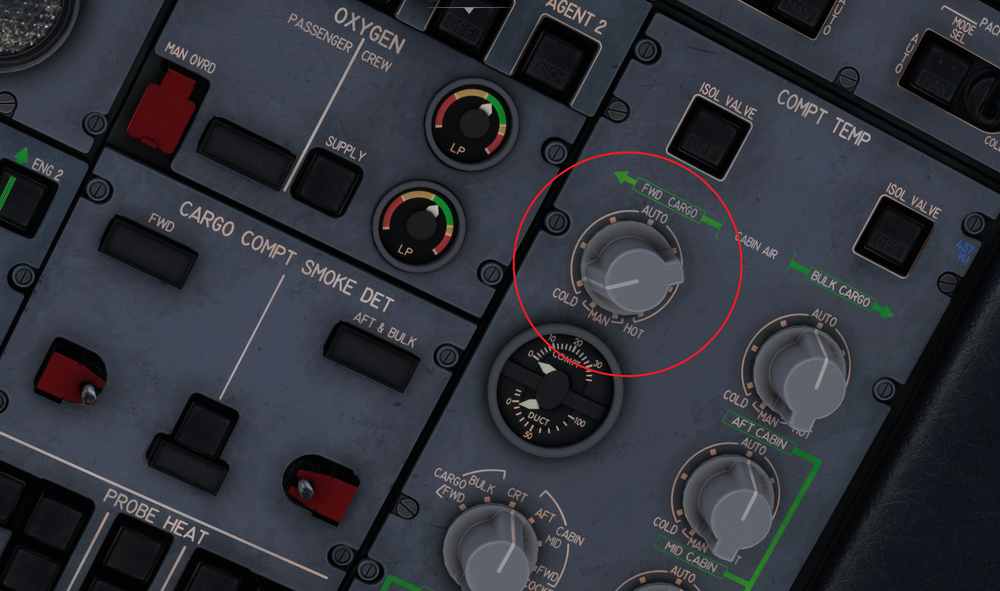
I found an issue where the FWD CARGO knob pictured is not moveable. I do not see a clickspot and it doesnt function. (Using the PAX version)
-
Glad it helped, I dont have the saitek panels so im not sure about that.
-
For steering make sure you have "Rudder Controls Tiller" set to ON in the Setting app on the EFB. As for IRS there are 3 IRS switches you have to set to the NAV postion on the aft overhead. After that you need to enter the Deaprture and Arrival airport on the INIT page and then hit Align IRS. LMK if that helps


