



Skip to content
View in the app

A better way to browse. Learn more.

iniBuilds Forum

A full-screen app on your home screen with push notifications, badges and more.

To install this app on iOS and iPadOS
  1. Tap the Share icon in Safari
  2. Scroll the menu and tap Add to Home Screen.
  3. Tap Add in the top-right corner.
To install this app on Android
  1. Tap the 3-dot menu (⋮) in the top-right corner of the browser.
  2. Tap Add to Home screen or Install app.
  3. Confirm by tapping Install.

Jared Miller

Member
  • Joined

  • Last visited

Everything posted by Jared Miller

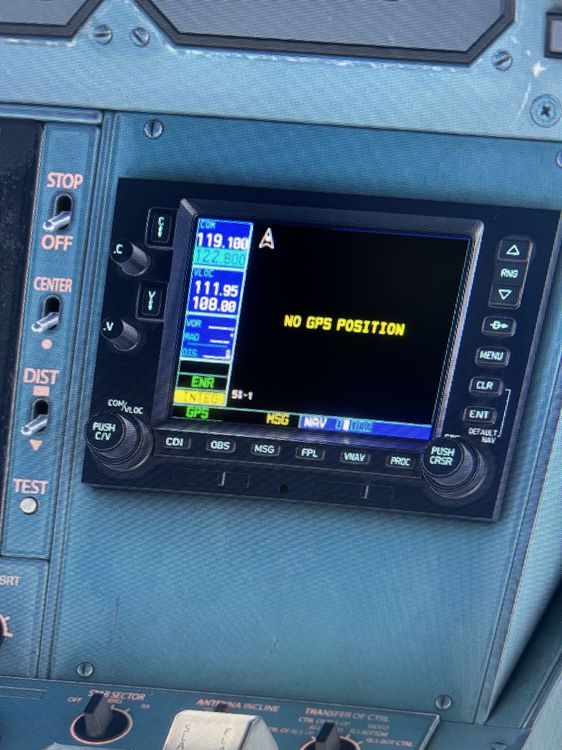
  1. I’ve been flying this aircraft for a while. Hit after the December update in MSFS I lose GPS position on the Nav and no longer can follow the flight path on AP. Any help on keeping this from happening or how to get the GPS back? Happens after about 3 hours of flight.
  2. I know it been a while since you posted, but I had this problem on Xbox. Turned off live weather and messed with the cache clearing in settings. That took care of it for me. Saw a YouTube video on it. It had to do with RAM and the game rendering. Also think I uninstalled world updates. Apparently those load even when you’re not in that area of the world and take up a lot of RAM.

Account

Navigation

Configure browser push notifications

Chrome (Android)
  1. Tap the lock icon next to the address bar.
  2. Tap Permissions → Notifications.
  3. Adjust your preference.
Chrome (Desktop)
  1. Click the padlock icon in the address bar.
  2. Select Site settings.
  3. Find Notifications and adjust your preference.