



Skip to content
View in the app

A better way to browse. Learn more.

iniBuilds Forum

A full-screen app on your home screen with push notifications, badges and more.

To install this app on iOS and iPadOS
  1. Tap the Share icon in Safari
  2. Scroll the menu and tap Add to Home Screen.
  3. Tap Add in the top-right corner.
To install this app on Android
  1. Tap the 3-dot menu (⋮) in the top-right corner of the browser.
  2. Tap Add to Home screen or Install app.
  3. Confirm by tapping Install.

AllAboutFlight

Member
  • Joined

  • Last visited

Everything posted by AllAboutFlight

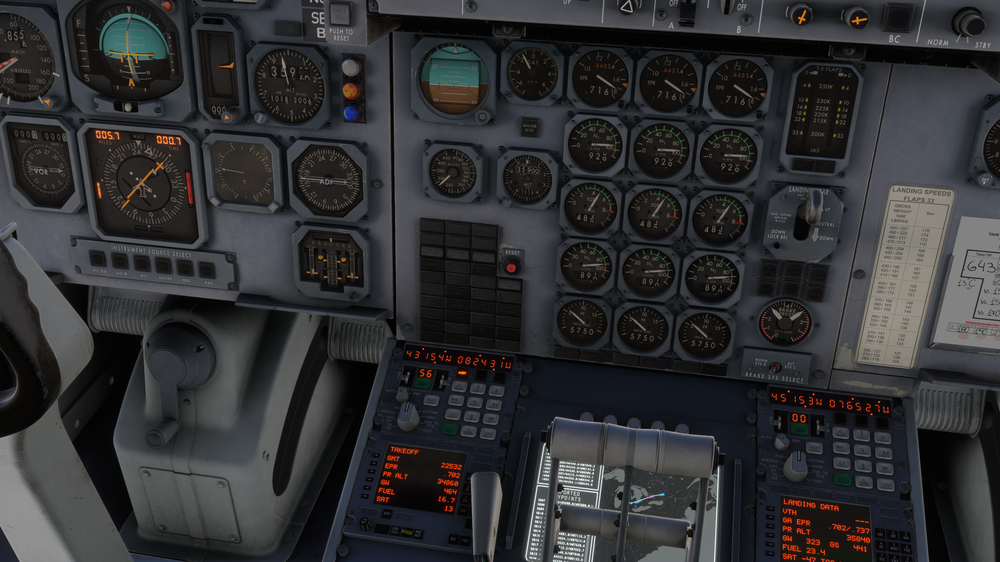
  1. This is still an issue. Exactly as other users mentioned above. Not sure why, but as the INS was supposed to transition between the first WPTs 5 and 6, it just froze and the aircraft started drifting off away from the established route. I managed to save the flight (as I was already several hours into the flight) by activating the map and GPS from the PFB menu. I am unable to utilize INS 2 or 3 for primary navigation. Only the GPS/VOR nav works. Tried resetting/aligning INS in flight to no avail. I also tried to manually add the next waypoints of the route (1-9) and it did update the map display, but the INS is still bricked 😞 A quick update to fix this would be terrific! Thanks.
Account

Navigation

Configure browser push notifications

Chrome (Android)
  1. Tap the lock icon next to the address bar.
  2. Tap Permissions → Notifications.
  3. Adjust your preference.
Chrome (Desktop)
  1. Click the padlock icon in the address bar.
  2. Select Site settings.
  3. Find Notifications and adjust your preference.