



Skip to content
View in the app

A better way to browse. Learn more.

iniBuilds Forum

A full-screen app on your home screen with push notifications, badges and more.

To install this app on iOS and iPadOS
  1. Tap the Share icon in Safari
  2. Scroll the menu and tap Add to Home Screen.
  3. Tap Add in the top-right corner.
To install this app on Android
  1. Tap the 3-dot menu (⋮) in the top-right corner of the browser.
  2. Tap Add to Home screen or Install app.
  3. Confirm by tapping Install.

Scholli

Member
  • Joined

  • Last visited

  1. I experience said issue after a turnaround: Even after a DIR-TO the position of said fix is different on the ND line and the info in the top right corner. ND drawn seems to be correct, AP apparently wants to follow the info given in the top right corner.
  2. Sure, worked before in 1.02 all the time during my flights.
  3. Same here, worked before. Scrolling the knob changed the blue indication of the PFD, however didn't change the "---" on the MCP and/or the mode. Same for FL CHG.
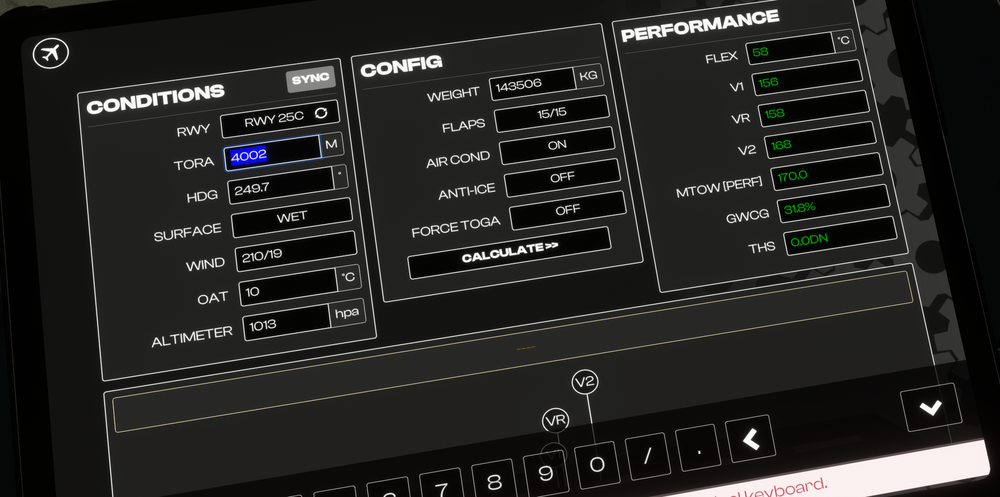
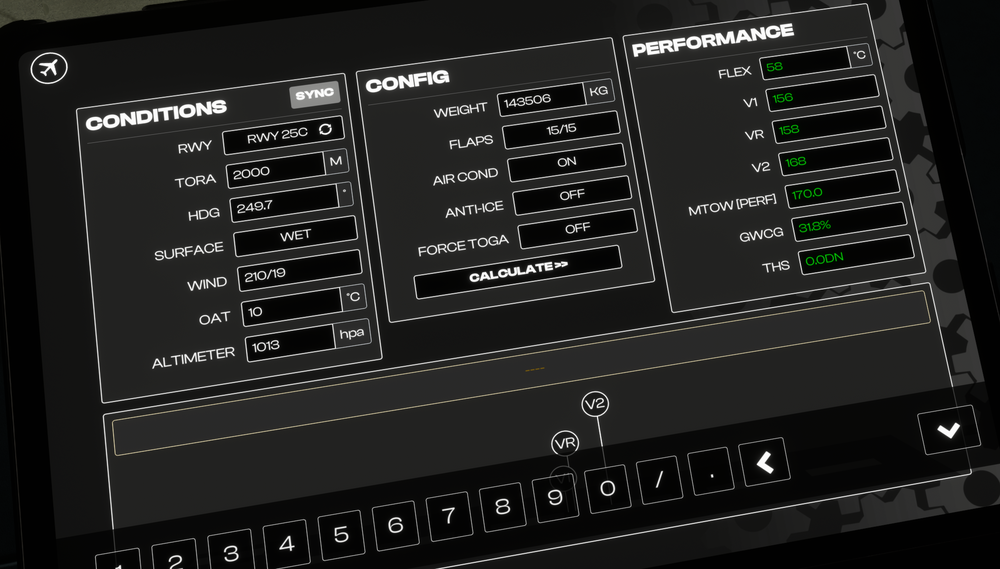
  4. Shortening the TORA to 2000m had no effect to the calculated values, had pressed "calculate" inbetween.
Account

Navigation

Configure browser push notifications

Chrome (Android)
  1. Tap the lock icon next to the address bar.
  2. Tap Permissions → Notifications.
  3. Adjust your preference.
Chrome (Desktop)
  1. Click the padlock icon in the address bar.
  2. Select Site settings.
  3. Find Notifications and adjust your preference.