



Skip to content
View in the app

A better way to browse. Learn more.

iniBuilds Forum

A full-screen app on your home screen with push notifications, badges and more.

To install this app on iOS and iPadOS
  1. Tap the Share icon in Safari
  2. Scroll the menu and tap Add to Home Screen.
  3. Tap Add in the top-right corner.
To install this app on Android
  1. Tap the 3-dot menu (⋮) in the top-right corner of the browser.
  2. Tap Add to Home screen or Install app.
  3. Confirm by tapping Install.

ttkl747

Member
  • Joined

  • Last visited

  1. ttkl747 replied to ttkl747's topic in Other
    Problem solved, just had to update INI Manger Tim
  2. ttkl747 posted a topic in Other
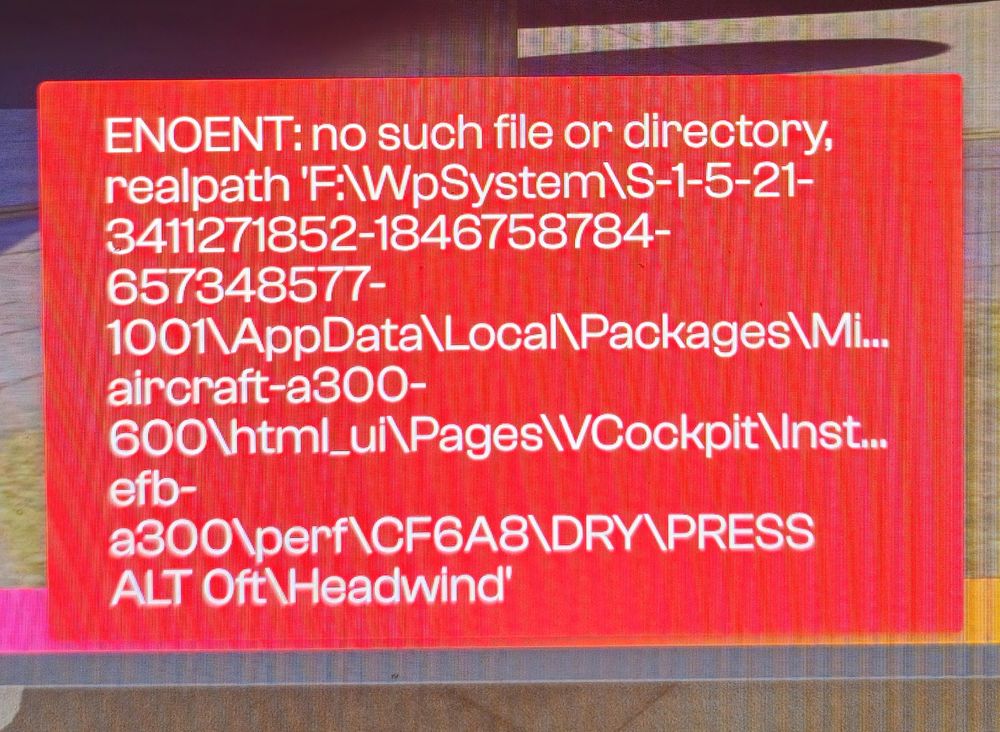
    Trying to do a clean install of the A300 (the lastest version) i keep getting a ENOENT error not got a clue what this means any help would be appreciated have attached a pic of full message Regards Tim
  3. Yes i do have some scenery installed but ELLX is not one of them..
  4. Hi all, When trying to set up a flight and i go to set up the departure or arrival not all the sids or stars are showing up in the FMC dose not matter which airport i am at the same thing happens. for instance ELLX 24=Y Arrival has 13 stars and 4 via's in the FMC i only get 5 stars and 4 via;s, and yes my Airac is up to date. Any thoughts Regards Tim

Account

Navigation

Configure browser push notifications

Chrome (Android)
  1. Tap the lock icon next to the address bar.
  2. Tap Permissions → Notifications.
  3. Adjust your preference.
Chrome (Desktop)
  1. Click the padlock icon in the address bar.
  2. Select Site settings.
  3. Find Notifications and adjust your preference.