




FAC257
Member
-
Joined
-
Last visited
Everything posted by FAC257
-
Just got a chance to check the new update. All is normal now. The screen fuel tank indicators are now correctly labeled and match the selected fuel tank switches fuel usage. Thank You!
-
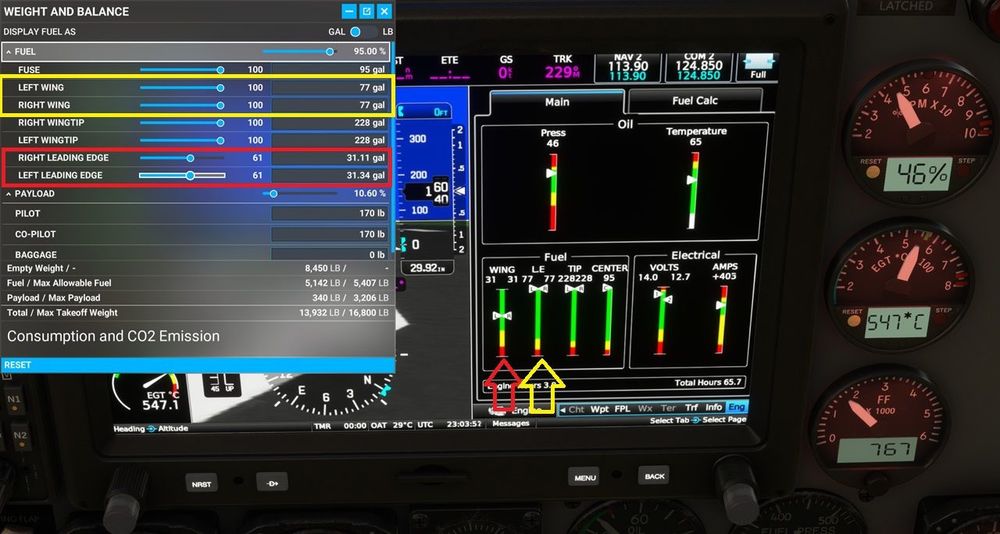
Rich, On mine I don't have the duplicated "LE" like in your image. On my Fuel Page the labels are left to right, "Wing, LE, Tip, Center". With the Wing Fuel Switch on the fuel burns from the "LE" column, but the total gallons match the total gallons for the Wing Tanks on the MSFS drop down GUI Fuel Page. With the LE Fuel Switch on the Fuel burns from the "Wing" column, but the total gallons match the total gallons for the LE Tanks on the MSFS drop down GUI Fuel Page. If the labels "Wing" & "LE" were swapped, then the fuel being burned would match both the Fuel Switch condition and the total gallons on the drop down and cockpit fuel page would match.
-
Found a new minor issue on this last flight using the modern cockpit. There is a typo on the fuel level page on the glass display. The "Wing" and "LE" should be reversed. The gallons readout numbers on that display are correct and match both the fuel switch positions and MSFS drop down GUI as to which fuel is being used. But the labeling on the digital display for those two tanks is backwards.
-
Nico, I found the gun option about 5 minutes after I posted but thank you for such a quick response. Also, thanks for the info about the MSMP & store transfer. FAC257
-
I originally purchased the P-40 through the Market Place. Then after deciding that would rather have the P-40 with guns instead of nubs, I bought the real version through Simmarket. What I'm running into, is even after deleting every reference I can find in the MSFS install to the MSMP version of the P-40, and then installing the Simmarket version, there still aren't any guns. Am I missing something or is that just the way it is? 🙂 Thanks FAC257

