



Skip to content
View in the app

A better way to browse. Learn more.

iniBuilds Forum

A full-screen app on your home screen with push notifications, badges and more.

To install this app on iOS and iPadOS
  1. Tap the Share icon in Safari
  2. Scroll the menu and tap Add to Home Screen.
  3. Tap Add in the top-right corner.
To install this app on Android
  1. Tap the 3-dot menu (⋮) in the top-right corner of the browser.
  2. Tap Add to Home screen or Install app.
  3. Confirm by tapping Install.

Juancar737

Member
  • Joined

  • Last visited

  1. Okay, I didn't tried without the navigation data from Navigraph, thanks for answering me.
  2. I forgot to mention that I was using last AIRAC cycle from Navigraph.
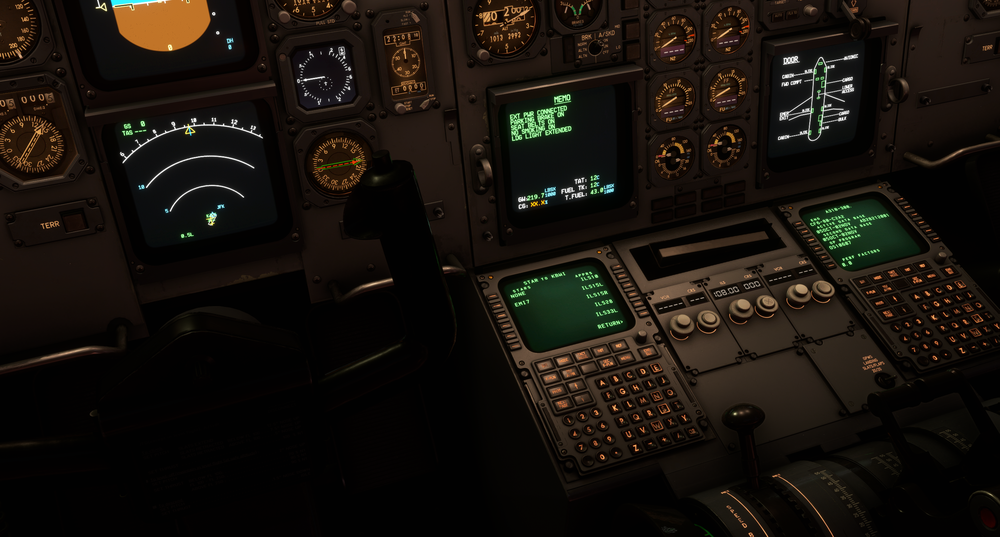
  3. Hi, I was not able to put the needed STAR for my flight because it didn't show on the list, indeed only one STAR was abiable to select as you can see in de attached image, the capture shows a second time I opened the simulator to reproduce the situation in order to post it here, so the error has repeated again. Thanks for your time.
Account

Navigation

Configure browser push notifications

Chrome (Android)
  1. Tap the lock icon next to the address bar.
  2. Tap Permissions → Notifications.
  3. Adjust your preference.
Chrome (Desktop)
  1. Click the padlock icon in the address bar.
  2. Select Site settings.
  3. Find Notifications and adjust your preference.