



Skip to content
View in the app

A better way to browse. Learn more.

iniBuilds Forum

A full-screen app on your home screen with push notifications, badges and more.

To install this app on iOS and iPadOS
  1. Tap the Share icon in Safari
  2. Scroll the menu and tap Add to Home Screen.
  3. Tap Add in the top-right corner.
To install this app on Android
  1. Tap the 3-dot menu (⋮) in the top-right corner of the browser.
  2. Tap Add to Home screen or Install app.
  3. Confirm by tapping Install.

AmitP

Member
  • Joined

  • Last visited

Everything posted by AmitP

  1. Dear Team, You don't have an idea how much happiness you have just given me. I will count on that day of release of -300F. I am die hard CARGO flyer and a fan of A300F. Since, it is actually not there yet, I am managing somehow with A310, which is an amazing plane. Will embrace A300F with love. Waiting to see my FEDEX and DHL planes 😄 Thanks once again !! Warm Regards
  2. Cargo verion please. Desperately looking for. Can't go on with a FEDEX or DHL model with windows, LOL.
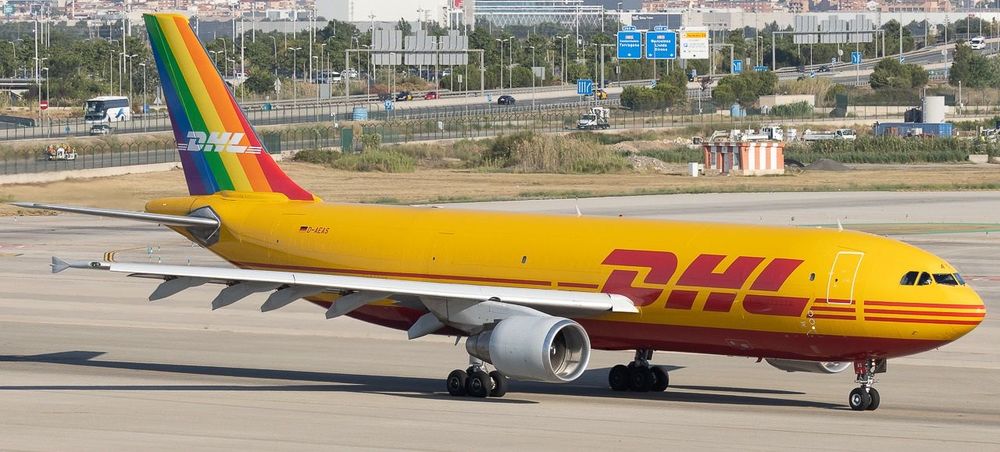
  3. Please someone direct me to a good MSFS A310 CARGO DHL livery (without windows). I am searching everywhere without any luck. D-AEAS as example. Any other registration would be good enough too. Thanks!
Account

Navigation

Configure browser push notifications

Chrome (Android)
  1. Tap the lock icon next to the address bar.
  2. Tap Permissions → Notifications.
  3. Adjust your preference.
Chrome (Desktop)
  1. Click the padlock icon in the address bar.
  2. Select Site settings.
  3. Find Notifications and adjust your preference.