



Skip to content
View in the app

A better way to browse. Learn more.

iniBuilds Forum

A full-screen app on your home screen with push notifications, badges and more.

To install this app on iOS and iPadOS
  1. Tap the Share icon in Safari
  2. Scroll the menu and tap Add to Home Screen.
  3. Tap Add in the top-right corner.
To install this app on Android
  1. Tap the 3-dot menu (⋮) in the top-right corner of the browser.
  2. Tap Add to Home screen or Install app.
  3. Confirm by tapping Install.

Wrap23

Member
  • Joined

  • Last visited

Everything posted by Wrap23

  1. Ah ha! How on earth does one discover this inside scoop?
  2. Such a shame😔I love the T-33 and when I heard ini was creating it one of my first thoughts was “I hope jankees does his magic on this.” Not a repainter so I don’t understand the difficulty you describe. But what a disappointment you can’t repaint and texture it.
  3. Wrap23 replied to Wrap23's topic in Other
    Just bought it!!!!
  4. Wrap23 replied to Wrap23's topic in Other
    Looked at those documents. General Stafford! What a career! Just passed this year at 93.
  5. Wrap23 replied to Wrap23's topic in Other
    Awesome thanks for the links!
  6. Wrap23 posted a topic in Other
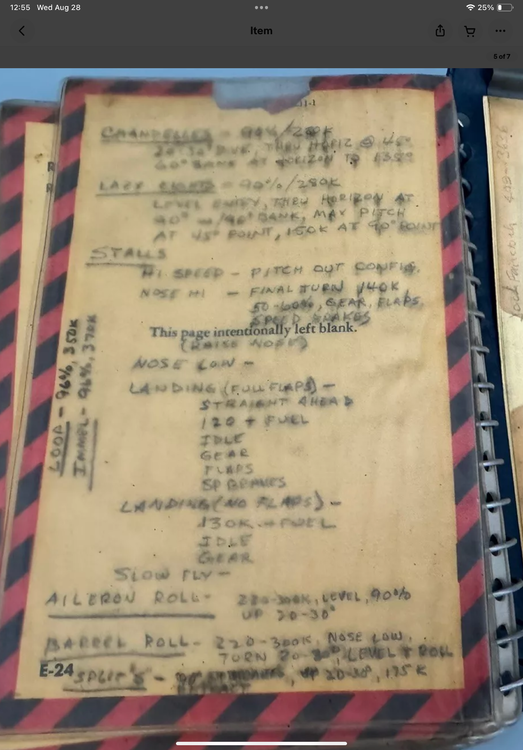
    Found this online. A little blurry but can be deciphered. Some performance numbers for having fun in the T-Bird from an actual T-Bird pilot. Alright INI, let’s see how close the numbers are! 😁
Account

Navigation

Configure browser push notifications

Chrome (Android)
  1. Tap the lock icon next to the address bar.
  2. Tap Permissions → Notifications.
  3. Adjust your preference.
Chrome (Desktop)
  1. Click the padlock icon in the address bar.
  2. Select Site settings.
  3. Find Notifications and adjust your preference.