



Skip to content
View in the app

A better way to browse. Learn more.

iniBuilds Forum

A full-screen app on your home screen with push notifications, badges and more.

To install this app on iOS and iPadOS
  1. Tap the Share icon in Safari
  2. Scroll the menu and tap Add to Home Screen.
  3. Tap Add in the top-right corner.
To install this app on Android
  1. Tap the 3-dot menu (⋮) in the top-right corner of the browser.
  2. Tap Add to Home screen or Install app.
  3. Confirm by tapping Install.

MMATGA2ME99

Member
  • Joined

  • Last visited

Everything posted by MMATGA2ME99

  1. Well, that led to some interesting reading and commentary on this approach. You learn something new everyday. I grew up on LI and spent a considerable amount of time around and at JFK but had never noticed these. Thanks https://www.ifr-magazine.com/avionics/charted-visuals/
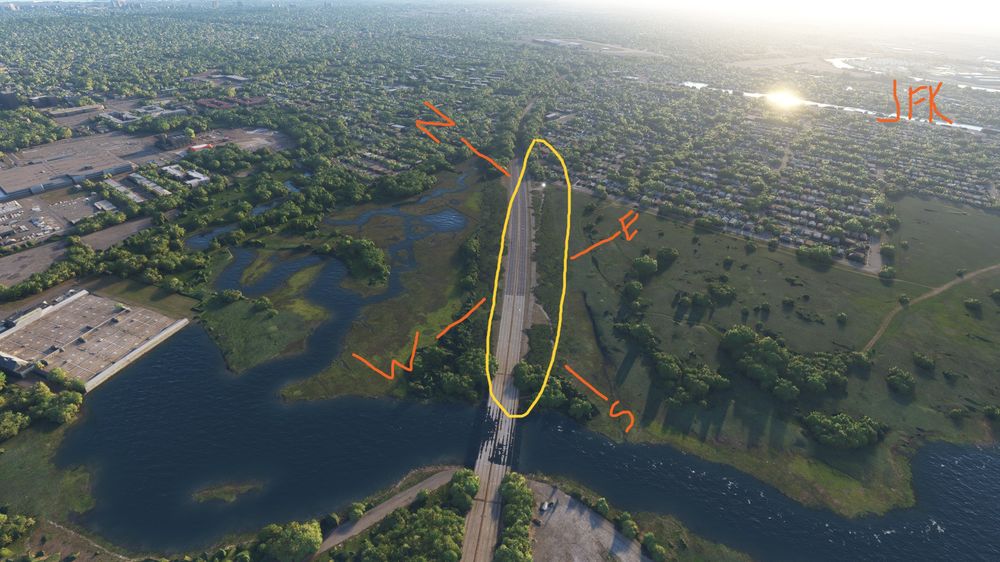
  2. I picked up some rogue ALS lighting just West of the airport pulsing from SW to NW directly above the Belt Parkway at 40.657043, -73.856825 (Link: Google Maps.) They can only be seen coming in from the S/SW/W, and they do not correspond to a runway. I grabbed a snapshot of the area but only managed to catch one of the pulses.
Account

Navigation

Configure browser push notifications

Chrome (Android)
  1. Tap the lock icon next to the address bar.
  2. Tap Permissions → Notifications.
  3. Adjust your preference.
Chrome (Desktop)
  1. Click the padlock icon in the address bar.
  2. Select Site settings.
  3. Find Notifications and adjust your preference.