




Ala13_Kokakolo
Member
-
Joined
-
Last visited
Everything posted by Ala13_Kokakolo
-
I have tested ground_crosswind_effect_zero_speed = 45.57ground_crosswind_effect_max_speed = 91.13 The plane behaves similarly to the original FM but the crosswind effects happen somehow more progressively with the plane speed rather than abruptly when reaching a given speed. I do not know which of both is more "real", tbh, but the more progressive one gives me more "warnings" to start counter it. Still is quite a challenge to take of with crosswinds up to 8knots, anything above that speed is impossible if you do not have a wide enough pist to change direction towards the wind.
-
Forget what I said there. I was testing today in diferent crosswind speeds. I can take of with 90 degree wind up to 8 knots with a bit of aileron, ruder and break.
-
Forget what I said there. I was testing today in diferent crosswind speeds. I can take of with 90 degree wind (from the right) up to 10 knots
-
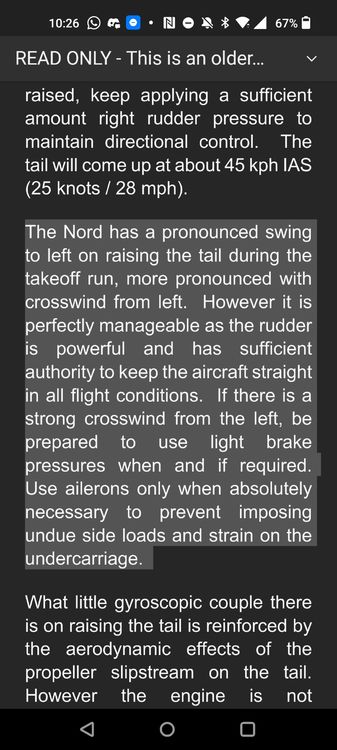
I added a section of the manual of one of the existing 108, the Nord 1002 Pingouin II.
-
I tried the new version today. With 7 knots crosswind (50 degrees so less than 7knots) the plane sinks left wing whatever I do. I know is a sensitive plane, but I do not believe this plane cannot take of with a sligtly crosswind breeze.

