



Skip to content
View in the app

A better way to browse. Learn more.

iniBuilds Forum

A full-screen app on your home screen with push notifications, badges and more.

To install this app on iOS and iPadOS
  1. Tap the Share icon in Safari
  2. Scroll the menu and tap Add to Home Screen.
  3. Tap Add in the top-right corner.
To install this app on Android
  1. Tap the 3-dot menu (⋮) in the top-right corner of the browser.
  2. Tap Add to Home screen or Install app.
  3. Confirm by tapping Install.

Ian1953

Member
  • Joined

  • Last visited

Everything posted by Ian1953

  1. Ian1953 replied to Ian1953's topic in Systems
    Hi Felix, Thanks for the heads up. I didn't have the livery pack installed, I will avoid it! Regards, Ian
  2. Ian1953 replied to Ian1953's topic in Systems
    Hi gumbyger, Thanks for responding so quickly - I did as you suggested, problem solved! Just have to work out which package was the culprit - I'll add them back one at a time until it breaks again. Thanks again.
  3. Ian1953 posted a topic in Systems
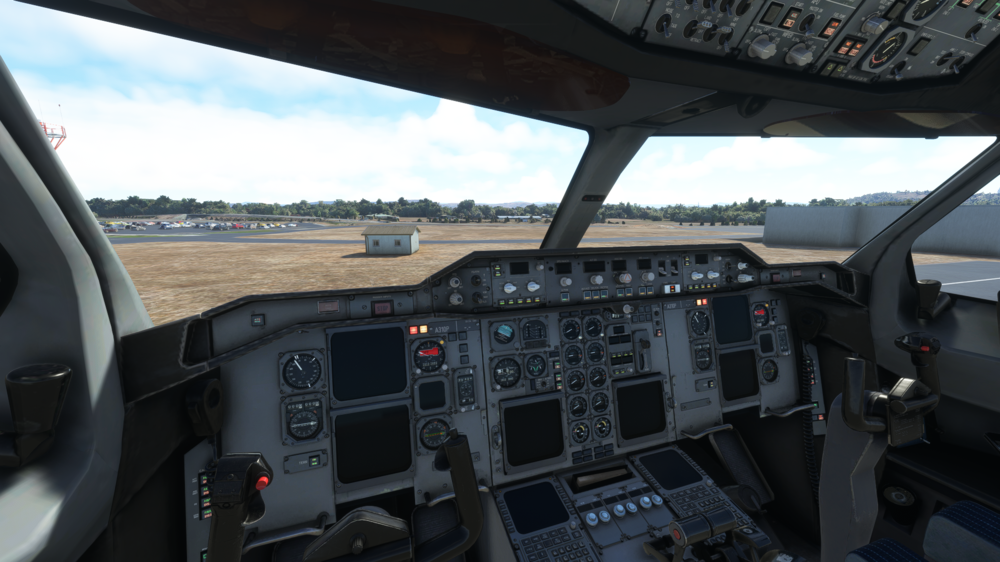
    Hi there, Having a problem with the MSFS version of the A310. When I start at an airport cold and dark, the attached screenshot shows the main panel display with some lights showing and the landing gear lever in the up position. None of the switches / buttons on the overhead panel work either. Nothings seems to work as expected when starting from runway either. I have deleted & re-installed the aircraft to no avail. I haven't seen this particular problem described in the MS forums so I assume there must be a problem with my setup. Does anyone have any thoughts?
Account

Navigation

Configure browser push notifications

Chrome (Android)
  1. Tap the lock icon next to the address bar.
  2. Tap Permissions → Notifications.
  3. Adjust your preference.
Chrome (Desktop)
  1. Click the padlock icon in the address bar.
  2. Select Site settings.
  3. Find Notifications and adjust your preference.