



Skip to content
View in the app

A better way to browse. Learn more.

iniBuilds Forum

A full-screen app on your home screen with push notifications, badges and more.

To install this app on iOS and iPadOS
  1. Tap the Share icon in Safari
  2. Scroll the menu and tap Add to Home Screen.
  3. Tap Add in the top-right corner.
To install this app on Android
  1. Tap the 3-dot menu (⋮) in the top-right corner of the browser.
  2. Tap Add to Home screen or Install app.
  3. Confirm by tapping Install.

DanTrawn

Member
  • Joined

  • Last visited

  1. Seems like last update threw my settings out the window. After turning those assists off it works perfectly fine! Thanks to ya‘ll for your great help!!!
  2. Will try that because I actually have „Auto-Rudder“ enabled maybe it‘ll fix that. Thanks!
  3. Is this in the UK? If yes then its just the Brookmans Park VOR so shouldnt be anything to worry about.
  4. So it seems like its a problem from Ini‘s side right? well at least its a known issue and Im nit alone! thanks for your answers😄
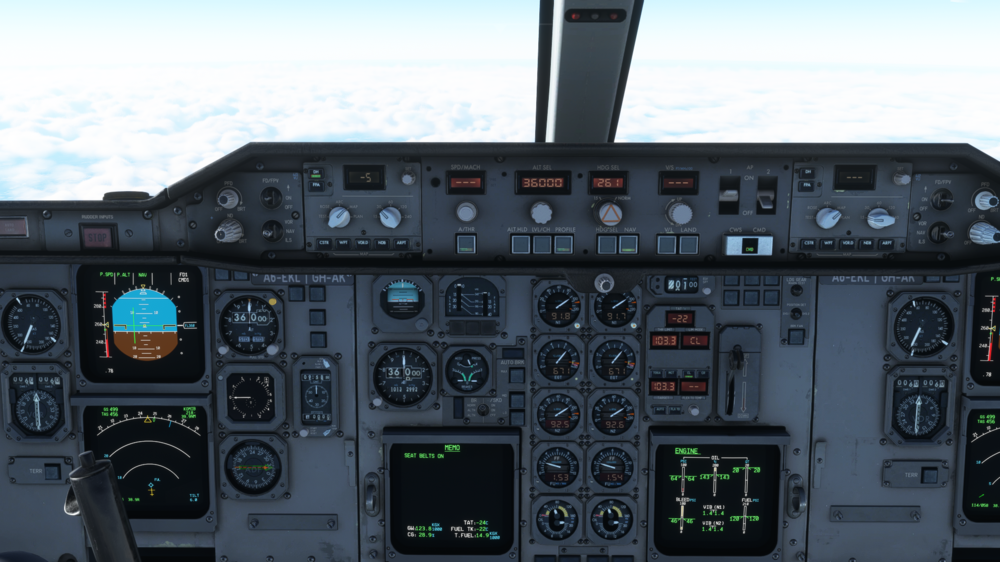
  5. Hello, I recently experienced a problem with the new A310 for the MSFS, where after takeoff there are no problems but as I pass some altitude the plane just wont follow the flight director anymore. Is there a solution for this(maybe Im doing something wrong?)? Or does someone have this problem too?
Account

Navigation

Configure browser push notifications

Chrome (Android)
  1. Tap the lock icon next to the address bar.
  2. Tap Permissions → Notifications.
  3. Adjust your preference.
Chrome (Desktop)
  1. Click the padlock icon in the address bar.
  2. Select Site settings.
  3. Find Notifications and adjust your preference.