



Skip to content
View in the app

A better way to browse. Learn more.

iniBuilds Forum

A full-screen app on your home screen with push notifications, badges and more.

To install this app on iOS and iPadOS
  1. Tap the Share icon in Safari
  2. Scroll the menu and tap Add to Home Screen.
  3. Tap Add in the top-right corner.
To install this app on Android
  1. Tap the 3-dot menu (⋮) in the top-right corner of the browser.
  2. Tap Add to Home screen or Install app.
  3. Confirm by tapping Install.

Stevenowen37

Member
  • Joined

  • Last visited

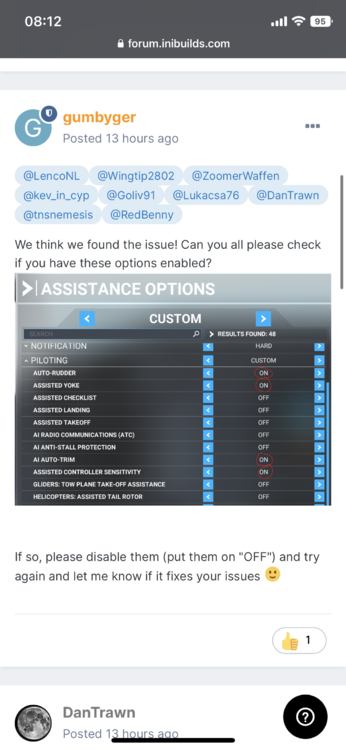
  1. Fixed my issue earlier on Xbox Series X, couldn’t comment on the other post as said it was closed. Although hoping it’ll work with those turned on at some point.
  2. Mine worked fine soon as I did this, still have issues with ATC so I think you need to set the route on the world planner first but need try if that fixes that, still have to program on the plane system for be loaded in regardless. if you’re missing ATC talking to you then Ensure you turn it on in the cockpit, select vf1 (I think) then turn the volume dial up.
  3. Had same issues on series x, mate found this reply to issue and when I tried this morning worked fine.
Account

Navigation

Configure browser push notifications

Chrome (Android)
  1. Tap the lock icon next to the address bar.
  2. Tap Permissions → Notifications.
  3. Adjust your preference.
Chrome (Desktop)
  1. Click the padlock icon in the address bar.
  2. Select Site settings.
  3. Find Notifications and adjust your preference.