




ManuelLL
Member
-
Joined
-
Last visited
-
-
Hello, Could you consider adding DCLB 1 & 2 for the RR engines, along with any other options available on the real A380? Currently, these options are only available for the EA engines, whereas the real A380 equipped with RR Trent 970 engines also has them. As an example, on a British Airways flight operated by aircraft registration G-XLEA, fitted with RR Trent 970 engines, the pilot can be heard calling, “Thrust, DCLB 2, Climb Autothrust”. I'll attach the video with the exact timing of the callout for reference.
-
-
-
-
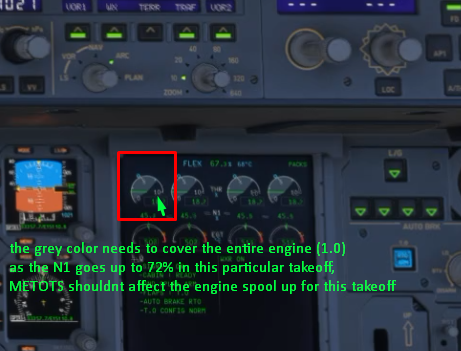
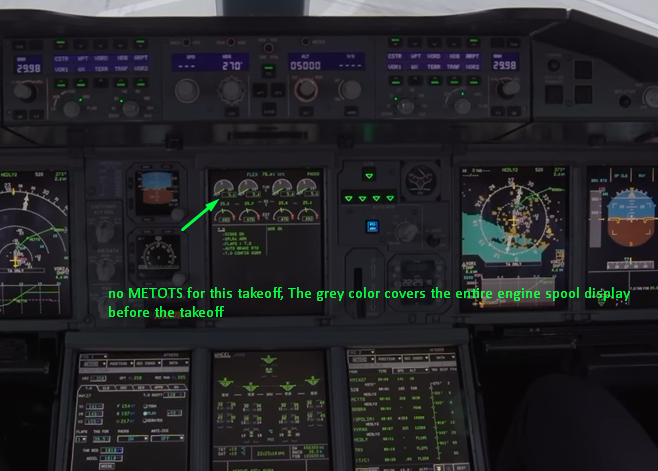
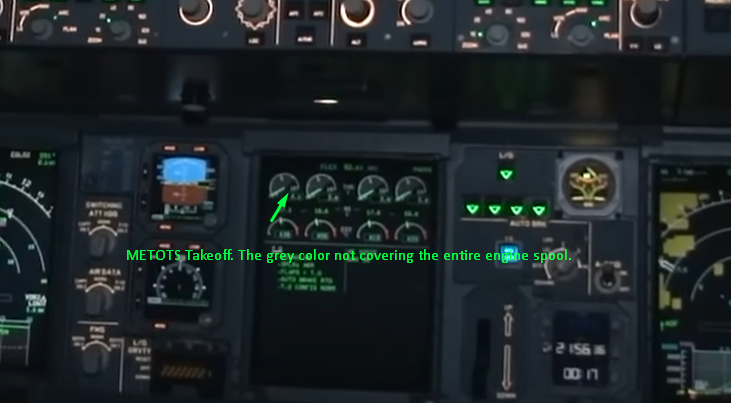
Departed today from WSSS to EGLLwith a TOW of 531 tons. for runway 20C, the calculated takeoff performance was only around 78-79% during the takeoff roll. Which seems quite unlikely and unrealistic considering the aircraft almost hit was very close to its MTOW. I also noticed an issue with the speed calculations. During takeoff, Vr speed being reached very late down the runway, if had rotated another 100-150 meters later, the aircraft would have run off the runway and ended up in the grass. I think there is issue with the takeoff performance calculations and with the engines themselves. I’ll attach a video of the takeoff later this day.So it is nice that you’ve implemented the METOTS logic into the sim. However, there are still some inaccuracies in the way it currently works. The main issue is that the iniBuilds A380s METOTS logic appears to apply a thrust limitation without taking the target N1 into account. On the real aircraft, this limitation should only apply when the target N1 exceeds 78%. In all other cases, the engines should spool directly to the commanded takeoff thrust, without being held at an intermediate N1 value before reaching the target. For example, in the current iniBuilds A380, if the target N1 is 73% during take-off, the engines remain at approximately 68% until reaching 35 knots, before spooling up to the target thrust. This does not appear to reflect the correct METOTS logic. I’ll attach a couple of photos and videos of the real aircraft for comparison. SIM: During takeoff, Stuck on 70.5 N1 Until 35kts, and then spolled to 72%. (Incorrect Logic) IRL, Non METOTS takeoff: https://youtu.be/pHui34_ODnc?si=Lr03VQaoLh9DwGfn&t=13 IRL, Correct logic of METOTS Takeoff: https://youtu.be/7pX9hxn-cmE?si=xrmIlb2I1sst3Otm&t=770
 Im having an issue where the final loadsheet isnt coming through. only PERLIM is working fine. Ive tried multiple solutions, including fully reinstalling the aircraft, removing WASM, enabling/disabling efb gsx integration, but nothing helped. and also, refresh CG button is not working at all


