



Skip to content
View in the app

A better way to browse. Learn more.

iniBuilds Forum

A full-screen app on your home screen with push notifications, badges and more.

To install this app on iOS and iPadOS
  1. Tap the Share icon in Safari
  2. Scroll the menu and tap Add to Home Screen.
  3. Tap Add in the top-right corner.
To install this app on Android
  1. Tap the 3-dot menu (⋮) in the top-right corner of the browser.
  2. Tap Add to Home screen or Install app.
  3. Confirm by tapping Install.

Pablo Higuita

Member
  • Joined

  • Last visited

Everything posted by Pablo Higuita

  1. How do i check in what SU i am? I'm not registered in any of the beta releases
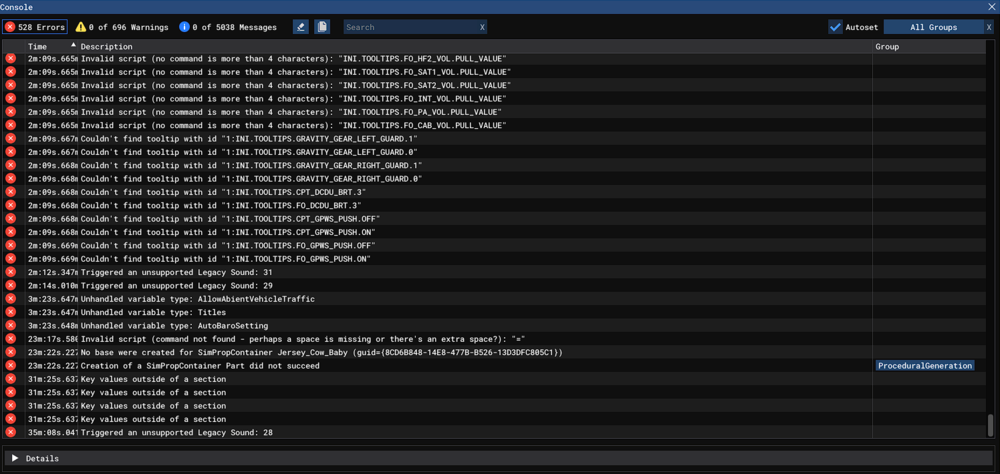
  2. Hello, i'm having a crash almost all the times i start the a340, sometimes while setting up the FMC on the ground, other times while on flight, where the aircraft just, looses all control, it behaves exactly as a WASM crash is supposed to happen, but no WASM crash reports in the Console. I'll attach a picture of the last error in the Console, buy there was not a single WASM error. Video of the same crash happening yesterday. Haven't been able to complete a single A340 flight in the last days.
Account

Navigation

Configure browser push notifications

Chrome (Android)
  1. Tap the lock icon next to the address bar.
  2. Tap Permissions → Notifications.
  3. Adjust your preference.
Chrome (Desktop)
  1. Click the padlock icon in the address bar.
  2. Select Site settings.
  3. Find Notifications and adjust your preference.