



Skip to content
View in the app

A better way to browse. Learn more.

iniBuilds Forum

A full-screen app on your home screen with push notifications, badges and more.

To install this app on iOS and iPadOS
  1. Tap the Share icon in Safari
  2. Scroll the menu and tap Add to Home Screen.
  3. Tap Add in the top-right corner.
To install this app on Android
  1. Tap the 3-dot menu (⋮) in the top-right corner of the browser.
  2. Tap Add to Home screen or Install app.
  3. Confirm by tapping Install.

mucramp1991

Member
  • Joined

  • Last visited

  1. Hey Eddie, i removed all Throttle Profiles and just left the Standart one, with this its working perfectly fine! :D Thanks for your help :D
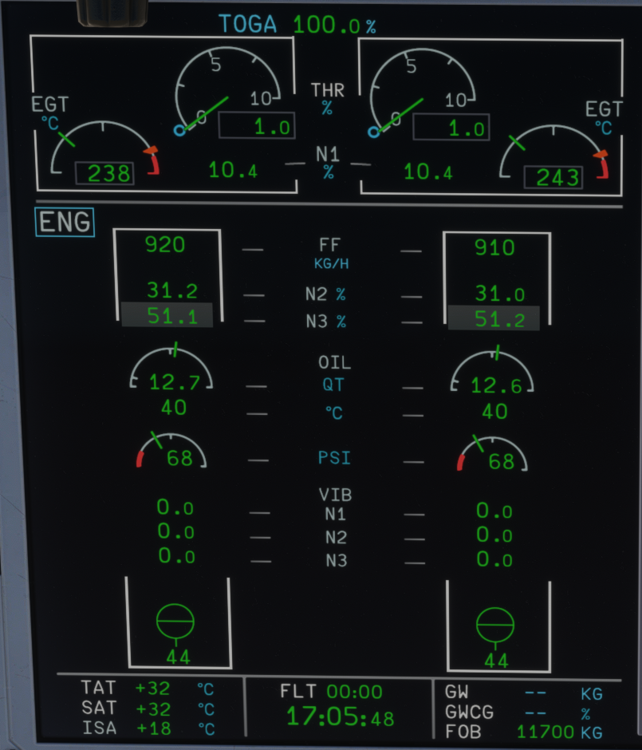
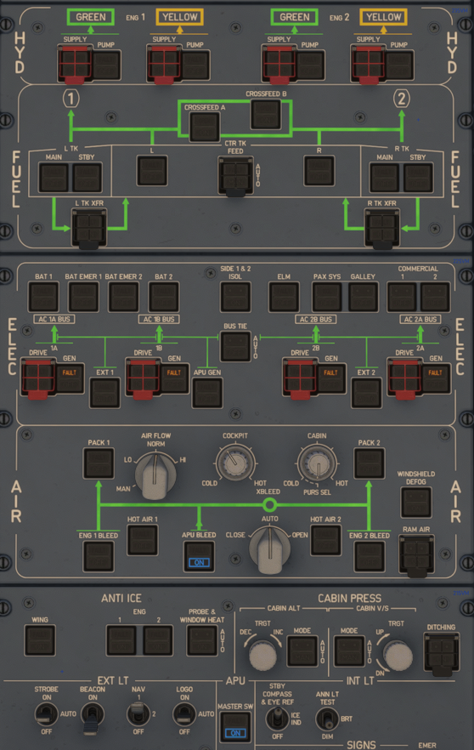
  2. Since the latest Update, i have a Fuel Flow, but no "ignition" the spool up stops at 10.4 N1/ 31.2 N2/ 51.1 N3 (N3 with grey backround). I cleared the WASM Folder, reinstalled the A/C several times, but nothing helps... maybe someone from the community can help...
Account

Navigation

Configure browser push notifications

Chrome (Android)
  1. Tap the lock icon next to the address bar.
  2. Tap Permissions → Notifications.
  3. Adjust your preference.
Chrome (Desktop)
  1. Click the padlock icon in the address bar.
  2. Select Site settings.
  3. Find Notifications and adjust your preference.