



Skip to content
View in the app

A better way to browse. Learn more.

iniBuilds Forum

A full-screen app on your home screen with push notifications, badges and more.

To install this app on iOS and iPadOS
  1. Tap the Share icon in Safari
  2. Scroll the menu and tap Add to Home Screen.
  3. Tap Add in the top-right corner.
To install this app on Android
  1. Tap the 3-dot menu (⋮) in the top-right corner of the browser.
  2. Tap Add to Home screen or Install app.
  3. Confirm by tapping Install.

flysky1213

Member
  • Joined

  • Last visited

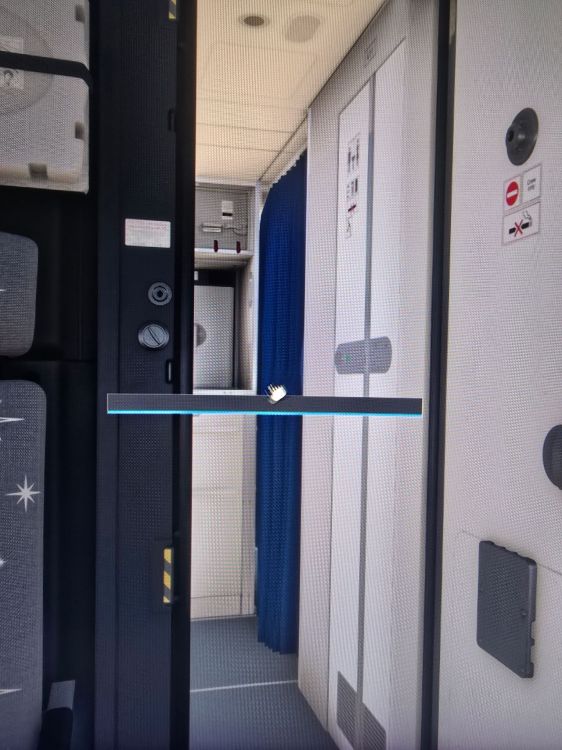
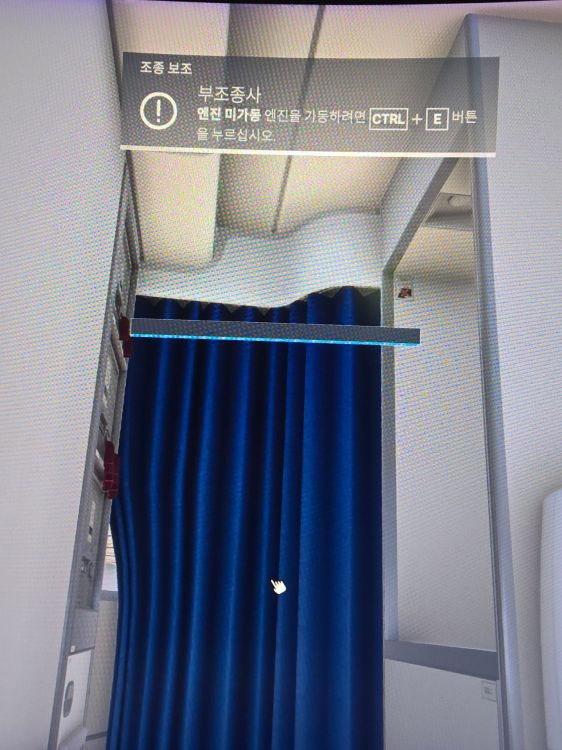
  1. Hello iniBuilds team, I am experiencing a visual bug with the A350-900 in MSFS 2024. Whenever I open or close the cabin curtains, a horizontal bar with blue stripes (which looks like a hidden interaction mesh or dummy object) becomes visible on the screen. (Please see the attached screenshots.) Here is what I have tried so far: Updated the aircraft and Cabin Pack to the latest versions via iniManager. Cleared the WASM folder for the A350 and let it recompile. Is this a known issue in MSFS 2024, or is there a specific fix for it? Thank you in advance for your help!
Account

Navigation

Configure browser push notifications

Chrome (Android)
  1. Tap the lock icon next to the address bar.
  2. Tap Permissions → Notifications.
  3. Adjust your preference.
Chrome (Desktop)
  1. Click the padlock icon in the address bar.
  2. Select Site settings.
  3. Find Notifications and adjust your preference.