



Skip to content
View in the app

A better way to browse. Learn more.

iniBuilds Forum

A full-screen app on your home screen with push notifications, badges and more.

To install this app on iOS and iPadOS
  1. Tap the Share icon in Safari
  2. Scroll the menu and tap Add to Home Screen.
  3. Tap Add in the top-right corner.
To install this app on Android
  1. Tap the 3-dot menu (⋮) in the top-right corner of the browser.
  2. Tap Add to Home screen or Install app.
  3. Confirm by tapping Install.

013K

Member

Everything posted by 013K

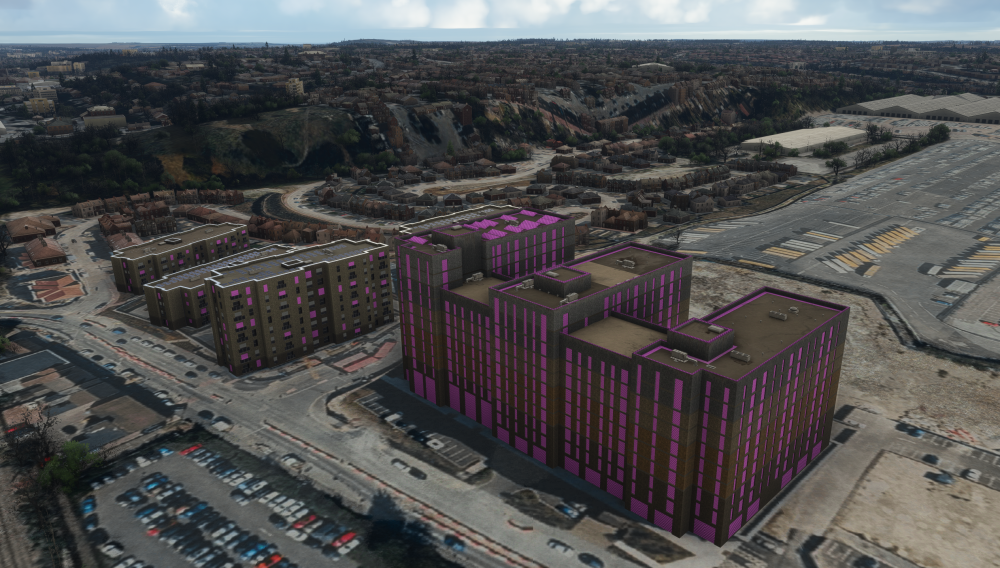
  1. Dear inibuilds team, There seems to be an issue with some custom crafted buildings outside the airport with pink/magenta textures on the windows and some parts of the roofs as seen in the provided screenshot. it seems to go back to normal when i position myself further away from the buildings. I have it installed through the inibuilds manager and the version number is v1.1.1. I have tried uninstalling and reinstalling the scenery but with no effect. Any help would be appreciated
Account

Navigation

Configure browser push notifications

Chrome (Android)
  1. Tap the lock icon next to the address bar.
  2. Tap Permissions → Notifications.
  3. Adjust your preference.
Chrome (Desktop)
  1. Click the padlock icon in the address bar.
  2. Select Site settings.
  3. Find Notifications and adjust your preference.