



Skip to content
View in the app

A better way to browse. Learn more.

iniBuilds Forum

A full-screen app on your home screen with push notifications, badges and more.

To install this app on iOS and iPadOS
  1. Tap the Share icon in Safari
  2. Scroll the menu and tap Add to Home Screen.
  3. Tap Add in the top-right corner.
To install this app on Android
  1. Tap the 3-dot menu (⋮) in the top-right corner of the browser.
  2. Tap Add to Home screen or Install app.
  3. Confirm by tapping Install.

Heath

Member
  • Joined

  • Last visited

Everything posted by Heath

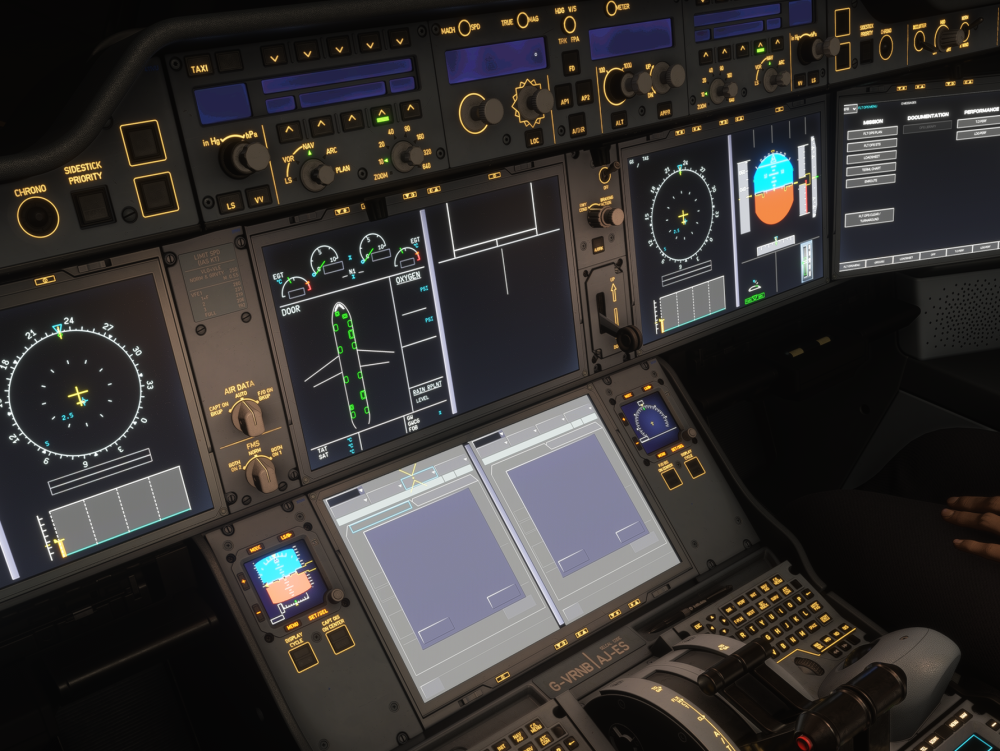
  1. Hi, Can anybody help please! The (MFD) / ECAM Center Displays have no text. I have tried removing all associated files from within the WASM folder and spawned at an airport on the runway, but this does not seem to fix the issues. I have attached an image, and would greatly appreciate if someone could point me in the right direction. Kind regards. Heath.
Account

Navigation

Configure browser push notifications

Chrome (Android)
  1. Tap the lock icon next to the address bar.
  2. Tap Permissions → Notifications.
  3. Adjust your preference.
Chrome (Desktop)
  1. Click the padlock icon in the address bar.
  2. Select Site settings.
  3. Find Notifications and adjust your preference.