steven77
Member
-
Joined
-
Last visited
Everything posted by steven77
-
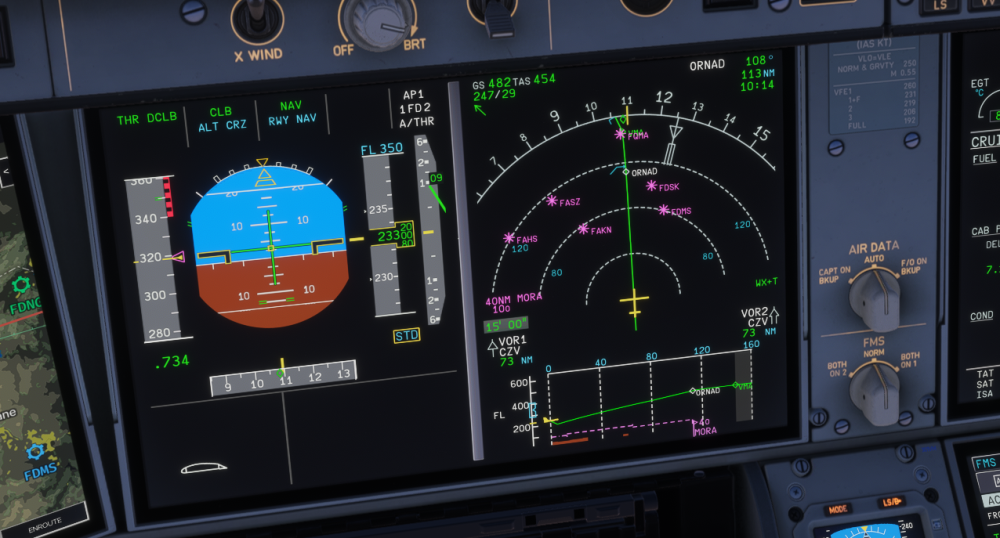
Hello iniBuilds team, I have just updated my iniBuilds A350 to the latest version 1.2.7, and I'm experiencing an issue where "RWY NAV" remains displayed in blue on the PFD, even when the aircraft is already airborne and climbing. As shown in the attached screenshot: NAV mode is active (green). RWY NAV remains armed (blue). The aircraft is climbing normally in CLB mode. The aircraft is following the programmed flight plan correctly. As far as I understand, RWY NAV should disappear after takeoff, but it remains displayed throughout the flight. This issue is still present after updating to version 1.2.7. Is this a known bug, or is there something I might be missing in the aircraft setup? Is there any workaround or fix planned for an upcoming update? Thank you for your help!