




simmer220
Member
-
Joined
-
Last visited
Everything posted by simmer220
-
-
-
-
So the issue that i am having while landing the A220 is that the autobrake just doesn't work. I set the autobrake before landing as I am supposed to do and when I touchdown i toggle the reverse thrust the autobrake sets back to the off position and a ''auto flight failure'' on the inbound screen shows up. I have never had this issue with the A220 until recently. Is it something that I am doing wrong or is it just a malfunction but if it is something that I am doing wrong I am happy to receive help.
-
Hello! This is off topic but when can i expect the 1.0.10 update on Xbox?
-
Thanks! But when i upload the flight plan on the A330 it works so that confuses me a bit, but how do i get the up-to-date airac if that's the issue?
-
No, i do not
-
Where can I check if the sim and the aircraft are running on the same airac?
-
So when attempting to import the flight plan on the A321 NEO and A320 NEO it just doesn't want to load and it says that i have to enter my Simbrief ID, which I do but then when i try to load it, it says the exact same thing is it a glitch or do i have to do some thing different because my ID does show up like it is written there but it does not show up. Also I did the exact thing on the A330 and everything worked just fine.
-
Have you got any more clarification on the issue?
-
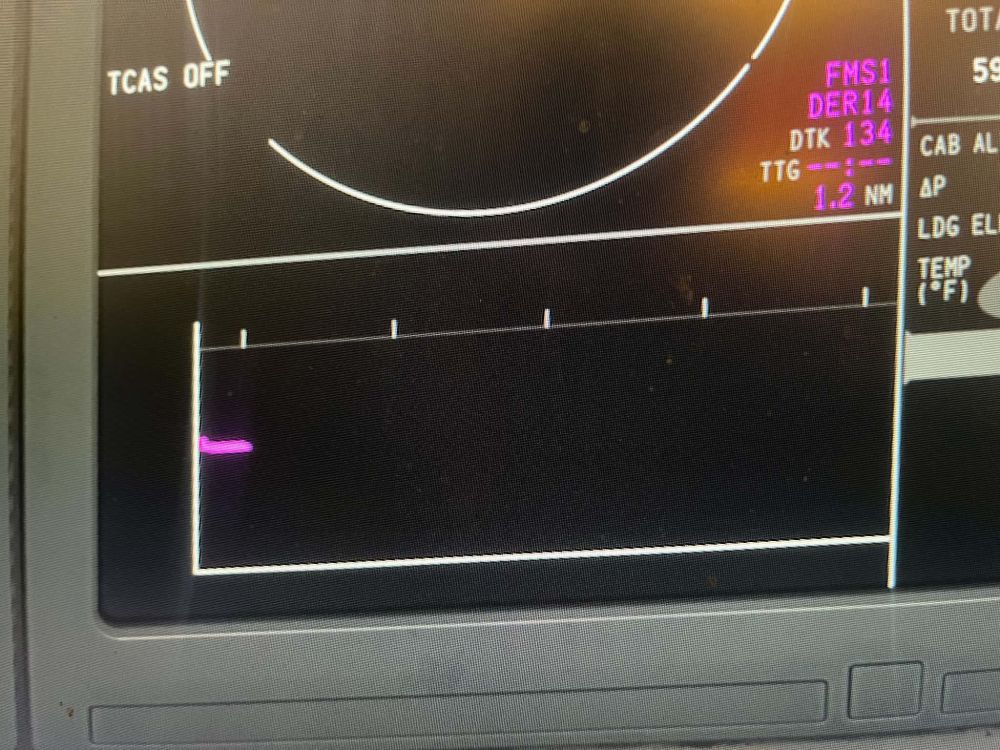
Hi! I couldn't get a screenshot since i am on Xbox but this is it:
-
Hello! After installing 1.0.9 update when i entered the flight plan, fuel and performance data and then i looked at the VSD nothing just shows up and the MSG shows ''VNAV sensor fail''. What do i have to do so everything works as its supposed to do?
-
Would it be possible to add new livery packs for the A220, as in either add new livery's to the excisting pack on XBOX or create a second livery pack including: Qantas, Bulgaria Air, Croatia Airlines, Air Austral, Lufthansa, LOT, Air Asia(even though Lufthansa, LOT and Air Asia A220's will come in the future) and maybe even more.

