



Skip to content
View in the app

A better way to browse. Learn more.

iniBuilds Forum

A full-screen app on your home screen with push notifications, badges and more.

To install this app on iOS and iPadOS
  1. Tap the Share icon in Safari
  2. Scroll the menu and tap Add to Home Screen.
  3. Tap Add in the top-right corner.
To install this app on Android
  1. Tap the 3-dot menu (⋮) in the top-right corner of the browser.
  2. Tap Add to Home screen or Install app.
  3. Confirm by tapping Install.

TreeFiddy

Member
  • Joined

  • Last visited

Everything posted by TreeFiddy

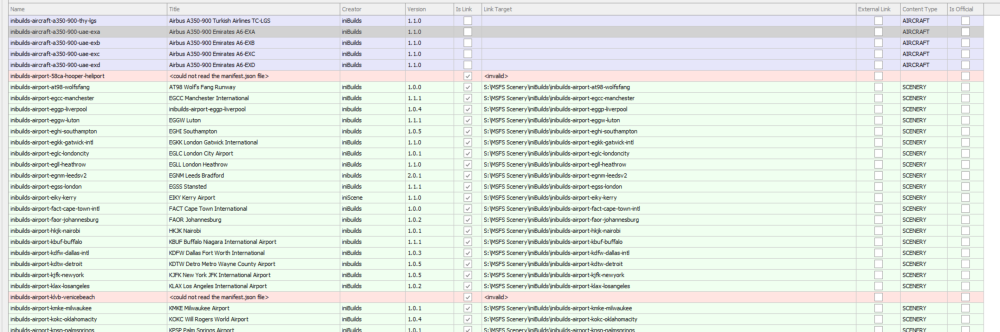
  1. Hi there, I have the same problem. I just installed my purchase and in addons linker I get a <could not read the manifest.json file> error. This is a clean install of MSFS2024 and the only add on I have any issues with. I have no other add on scenery in the LA area. KLAX itself is installed correctly; the missing folders are specifically Hooper Heliport and Venice Beach, leaving broken Community links. Their configuration switches are also absent in iniManager with KLAX v1.0.2.
Account

Navigation

Configure browser push notifications

Chrome (Android)
  1. Tap the lock icon next to the address bar.
  2. Tap Permissions → Notifications.
  3. Adjust your preference.
Chrome (Desktop)
  1. Click the padlock icon in the address bar.
  2. Select Site settings.
  3. Find Notifications and adjust your preference.