



Skip to content
View in the app

A better way to browse. Learn more.

iniBuilds Forum

A full-screen app on your home screen with push notifications, badges and more.

To install this app on iOS and iPadOS
  1. Tap the Share icon in Safari
  2. Scroll the menu and tap Add to Home Screen.
  3. Tap Add in the top-right corner.
To install this app on Android
  1. Tap the 3-dot menu (⋮) in the top-right corner of the browser.
  2. Tap Add to Home screen or Install app.
  3. Confirm by tapping Install.

Shane Goode

Member
  • Joined

  • Last visited

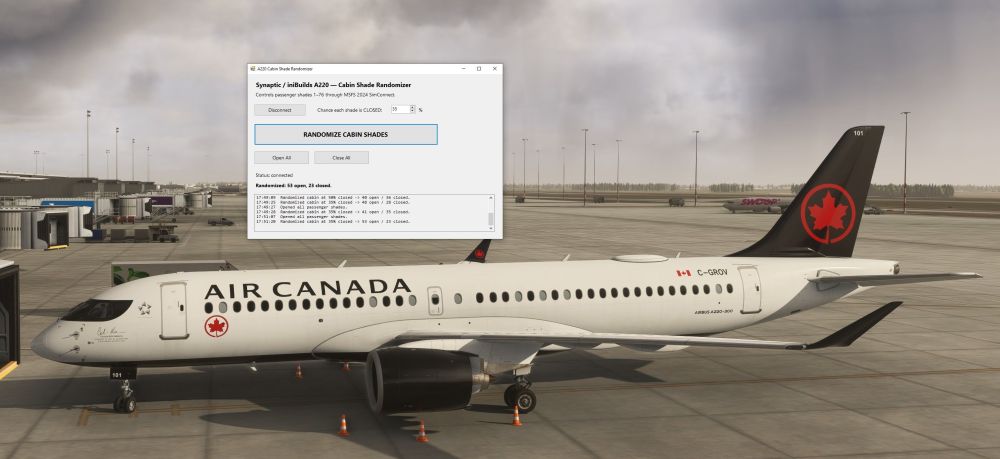
  1. Hello all, I just figured out how to create a cabin shade randomizer application working through sim connect to allow for window shades to be set to random open/closed positions. I figured this would help make the aircraft look a bit more realistic in the external view.... for some extra eye candy. This will allow you to randomize all window placements with the click of a button when the flight is loaded as opposed to manually moving all 76 windows after loading into your flight. Cheers, Shane
Account

Navigation

Configure browser push notifications

Chrome (Android)
  1. Tap the lock icon next to the address bar.
  2. Tap Permissions → Notifications.
  3. Adjust your preference.
Chrome (Desktop)
  1. Click the padlock icon in the address bar.
  2. Select Site settings.
  3. Find Notifications and adjust your preference.