Dreikosinus8289
Member
-
Joined
-
Last visited
-
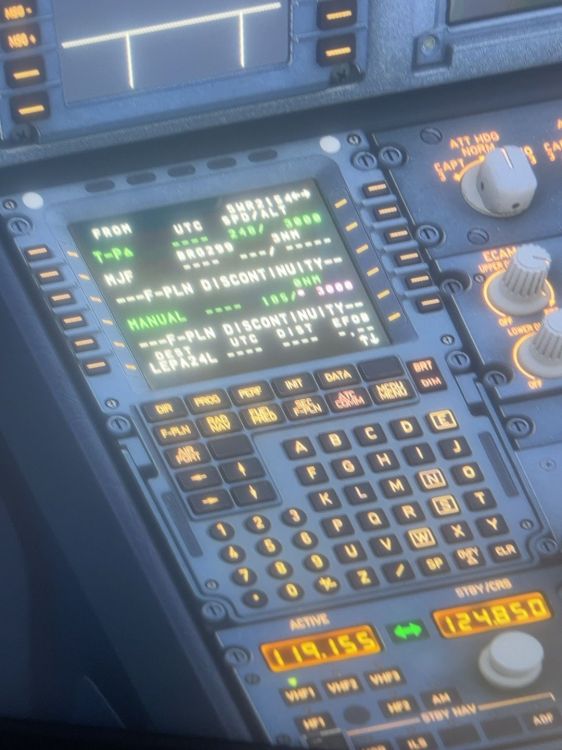
Hi Kyle, thank you again for logging my case internally. I would like to add one potentially useful reproduction detail after comparing my incident with other iniBuilds Airbus WASM/FMGS reports. In my case, the crash did not occur during the go-around itself. The sequence was: - go-around from the first ILS approach - aircraft stabilised at approximately 3,000 ft - active F-PLN contained MANUAL / F-PLN DISCONTINUITY / END OF F-PLN - Direct-To MJV - ARRIVAL / APPROACH was then being rebuilt in the MCDU - shortly afterwards, inibuilds-A320.wasm crashed and PFD/ND functionality was lost This seems potentially relevant because similar reports also involve ARRIVAL/ILS/STAR/transition/VIA selection or other active flight-plan modifications, sometimes even without a go-around. So the go-around itself may not be the root cause. A possible trigger area may instead be the FMGS active-flight-plan / procedure reconstruction when an existing or unusual flight-plan state is modified. A reproduction sequence that may be worth testing could therefore be: normal STAR + ILS approach → go-around → modified missed-approach / F-PLN state → MANUAL / DISCONTINUITY / END OF F-PLN where applicable → Direct-To → ARRIVAL / APPROACH re-selection or reconstruction → insert modified procedure → monitor FMGS/WASM state I am not claiming this is the confirmed root cause, but I thought this additional sequence might help narrow down the reproduction area. For reference, the related Microsoft Zendesk report is #284135. Thanks again for passing this to the team.
-
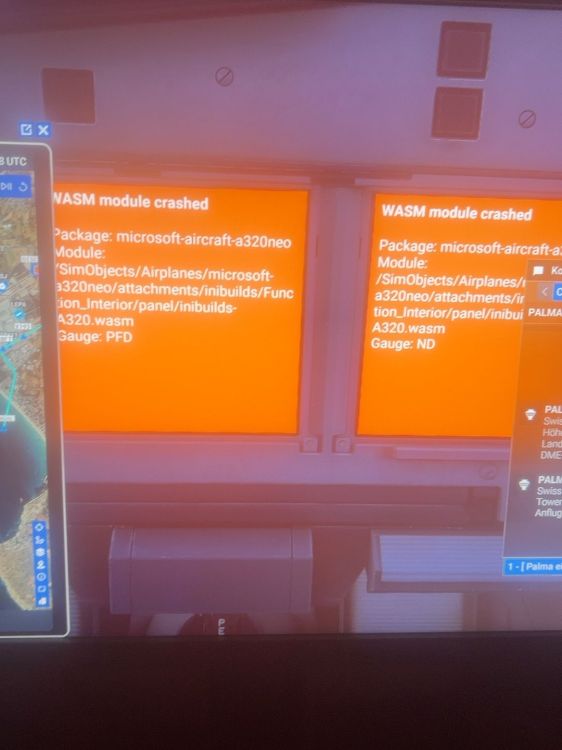
I experienced a very similar WASM crash in Microsoft Flight Simulator 2024 with the Microsoft/iniBuilds A320neo V2. Platform: PC – Microsoft Store Aircraft: Microsoft/iniBuilds A320neo V2 Flight: LSZH (Zurich) → LEPA (Palma de Mallorca) In my case, the crash occurred after a go-around while reprogramming the FMGS/MCDU for a second approach. Sequence immediately before the crash: Flying ILS Z RWY 24L into LEPA Go-around executed ATC instructed me to maintain 3,000 ft and cleared me toward MJV for another ILS Z RWY 24L approach After the go-around, the F-PLN showed MANUAL / F-PLN DISCONTINUITY / END OF F-PLN I entered and successfully inserted a Direct-To MJV I then started preparing/rebuilding the arrival/approach in the MCDU During this FMGS/MCDU reprogramming, the WASM module crashed Both the PFD and ND simultaneously displayed: WASM module crashed Package: microsoft-aircraft-a320neo Module: /SimObjects/Airplanes/microsoft-a320neo/attachments/inibuilds/Function_Interior/panel/inibuilds-A320.wasm Affected gauges: PFD and ND The aircraft itself remained in flight, but the loss of the primary flight displays made continuation of the flight impractical. The timing may be relevant because the crash happened directly after a go-around and during FMGS arrival/approach reprogramming. I have also reported this to Microsoft: Microsoft Flight Simulator forum – existing bug-logged thread: https://forums.flightsimulator.com/t/inibuilds-airbus-wasm-crash/737554 Microsoft Zendesk bug report: #284135 I can provide additional screenshots or test the same sequence again if that would help reproduce the issue.