




CaptainAL
Member
-
Joined
-
Last visited
-
-
Yes my bad. I meant the natural A. I wish they really take this into consideration.. maybe the flaps sound a slightly too loud by like 5-10%...? or overall cabin sound a bit too quiet.. well definitely the engine sounds from the cockpit can be improved quite a bit
-
really agree that the growl is missing, and its currently more of a high pitched "whistle" rather than the real a380 low growl sound in the cockpit your right that the freeware competitor nailed the interior very well actually
-
agreed i also have perfect pitch as a musician. boris had it perfect f sharp from the cockpit sound
-
I think the F sharp is only noticed in front of the wings like in the real cockpit... the g natural sound i only heard behind the wings.. which is accurate
-
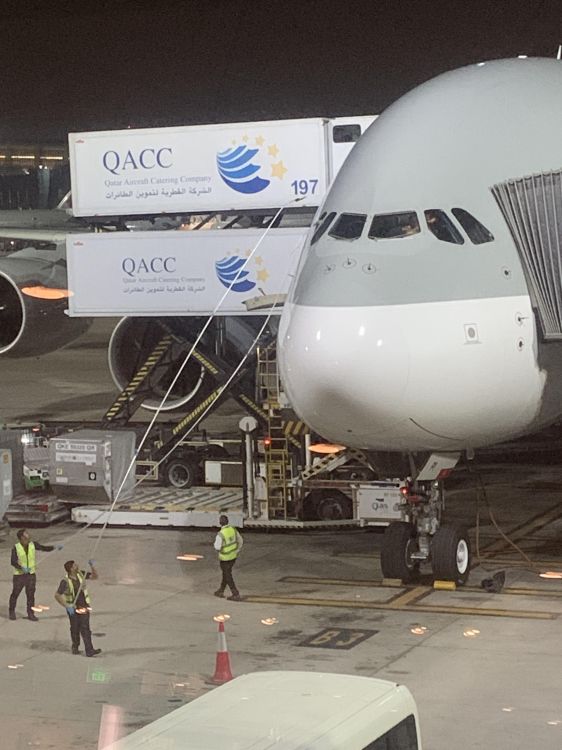
Hi, I heard there will be apparently nice V2 version for inibuilds a350 regarding geometry etc.. Now about upcoming A380. Is it only my eyes that is completely blind today... or is it following same trend regarding a bit wider cockpit windows/bigger.. than the real airplane? Just like the initial A350 release.. Something with the overall geometry Only thing that really stood out to me..... rest is absolutely fantastic❣️ thx
.thumb.png.8b8385d0a82a070afca2787a8b5b15ff.png)
.png.0bc447d2108a00189cd54ec381d1bc2c.png)
