sam_cordell
Member
-
Joined
-
Last visited
Everything posted by sam_cordell
-
Appreciate the quick reply — helpful to see! Perhaps an update to the normal maps could make it clear the windows are just plugged in the front. I'll be working on that! Would of course love to see an updated version that has windows down the right side, but totally understand if that isn't possible. Thanks so much.
-
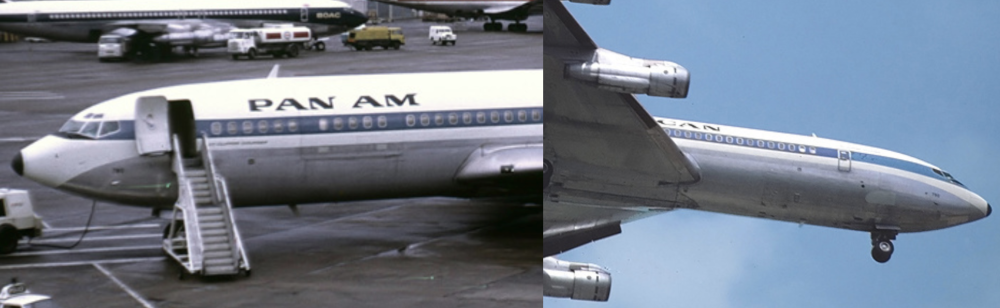
Hello! Seconding zbrainlezz's comment, and still feeling a bit confused... Are there any historical references that show a 707-320C/combi with this particular asymmetric window configuration — windows forward of the wing leading edge on the left side only? I've done some fairly deep searching online, including through the Boeing photo archives, and haven't been able to find a real-world airframe with this configuration. The historical -320C references I've found seem to indicate a different arrangement. I'd be very interested to know what reference material the art team used for this configuration. If there is a historical example, I'd love to see it. If not, and this doesn't correspond to an actual 707-320C configuration, it would be great to see the model updated for historical accuracy. Thank you for all you do — this is a fantastic addon. Keep up the great work. Reference images: Left & Right side of EI-ASN, a 707 Combi: Note windows go from the leading edge all the way to the right front door Left & Right side of N790PA, also a 707 Combi: Same window situation here