



Skip to content
View in the app

A better way to browse. Learn more.

iniBuilds Forum

A full-screen app on your home screen with push notifications, badges and more.

To install this app on iOS and iPadOS
  1. Tap the Share icon in Safari
  2. Scroll the menu and tap Add to Home Screen.
  3. Tap Add in the top-right corner.
To install this app on Android
  1. Tap the 3-dot menu (⋮) in the top-right corner of the browser.
  2. Tap Add to Home screen or Install app.
  3. Confirm by tapping Install.

360aviationuk

Member
  • Joined

  • Last visited

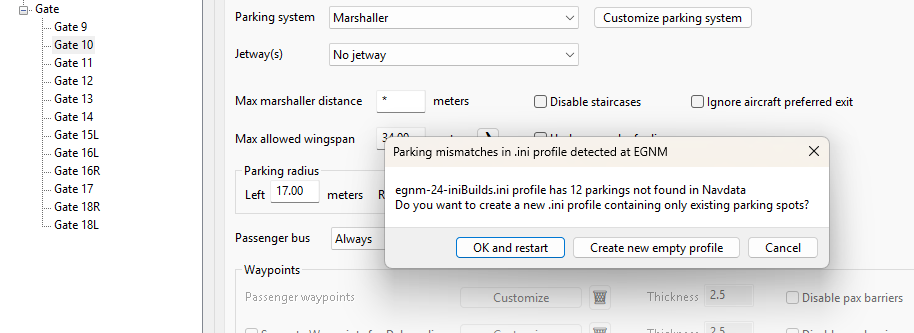
  1. Good afternoon, I purchased Leeds yesterday and installed the GSX Profile attached via IniManager. However every time I get an error for around 12 to 14 gate numbers where an error advises these gates cannot be found and related to the navdata? I have tried multiple methods of trying to fix this, however nothing has worked at all. The scenery works fine and has been installed across addon manager and community folder directly to test if there was an error with these methods. However always falls back to the parking mismatch error shown within this post. GSX reinstalled/relinked with 2024 EGNM reinstalled across community/addon link method Tried both IniManager profile/beta one provided directly with scenery Scenery indexes cleared No duplicate sceneries or profile
Account

Navigation

Configure browser push notifications

Chrome (Android)
  1. Tap the lock icon next to the address bar.
  2. Tap Permissions → Notifications.
  3. Adjust your preference.
Chrome (Desktop)
  1. Click the padlock icon in the address bar.
  2. Select Site settings.
  3. Find Notifications and adjust your preference.