



Skip to content
View in the app

A better way to browse. Learn more.

iniBuilds Forum

A full-screen app on your home screen with push notifications, badges and more.

To install this app on iOS and iPadOS
  1. Tap the Share icon in Safari
  2. Scroll the menu and tap Add to Home Screen.
  3. Tap Add in the top-right corner.
To install this app on Android
  1. Tap the 3-dot menu (⋮) in the top-right corner of the browser.
  2. Tap Add to Home screen or Install app.
  3. Confirm by tapping Install.

SetLeit

Member
  • Joined

  • Last visited

  1. Good evening @Max, Thanks a lot for your help, separating the fuselage model in multiple parts for each of the four materials solved the issue! Wishing you the best. 😊
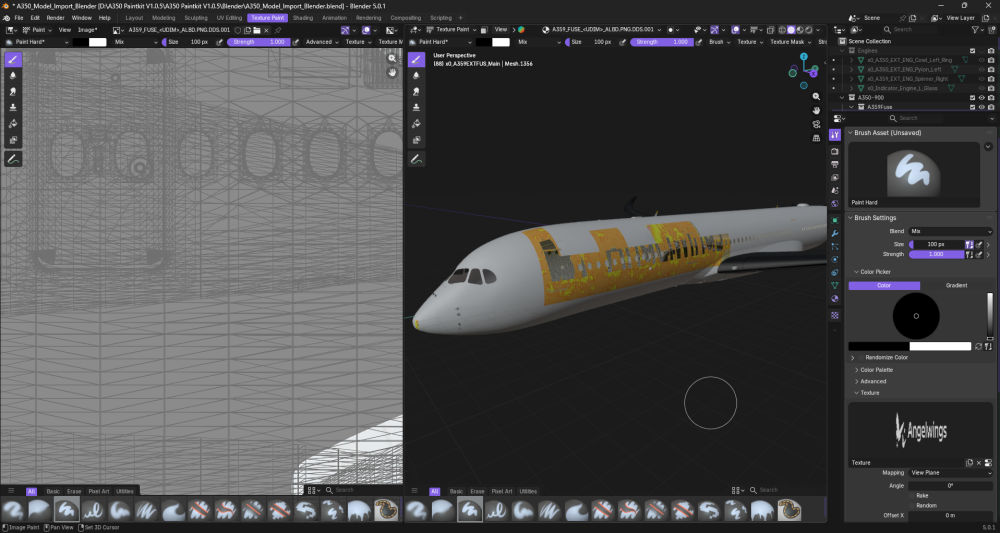
  2. Hi, Every time I try to paint anything onto the aircraft, the colour twists and turns into a mess. It isn't my first time using Blender, and I've tried changing the texture image files as well as reimporting everything into a new blender file, and this still happens for some reason... Any way to fix this? Cheers.
Account

Navigation

Configure browser push notifications

Chrome (Android)
  1. Tap the lock icon next to the address bar.
  2. Tap Permissions → Notifications.
  3. Adjust your preference.
Chrome (Desktop)
  1. Click the padlock icon in the address bar.
  2. Select Site settings.
  3. Find Notifications and adjust your preference.