



Skip to content
View in the app

A better way to browse. Learn more.

iniBuilds Forum

A full-screen app on your home screen with push notifications, badges and more.

To install this app on iOS and iPadOS
  1. Tap the Share icon in Safari
  2. Scroll the menu and tap Add to Home Screen.
  3. Tap Add in the top-right corner.
To install this app on Android
  1. Tap the 3-dot menu (⋮) in the top-right corner of the browser.
  2. Tap Add to Home screen or Install app.
  3. Confirm by tapping Install.

Markus1

Member
  • Joined

  • Last visited

Everything posted by Markus1

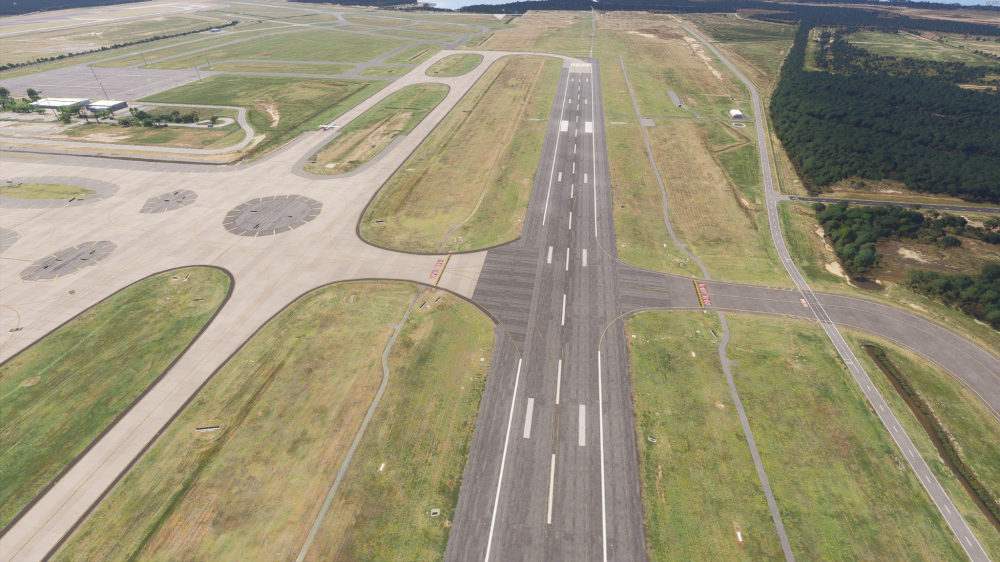
  1. Hi, I just bought the IniBuilds YBBN airport and I really love it with all the detail that was added :) Only thing I noticed is that there are no tire skid marks anywhere on the runways. In the product gallery in the iniBuilds store there is one screenshot that shows skid marks on the touch down zone. This looks to me like the textures are created but simply missed to add into the download package. I would greatly appreciate if they could be added. Without it the runways look kind of bland in my opinion. I added a screenshot from MSFS24: Best Regards
Account

Navigation

Configure browser push notifications

Chrome (Android)
  1. Tap the lock icon next to the address bar.
  2. Tap Permissions → Notifications.
  3. Adjust your preference.
Chrome (Desktop)
  1. Click the padlock icon in the address bar.
  2. Select Site settings.
  3. Find Notifications and adjust your preference.