



Skip to content
View in the app

A better way to browse. Learn more.

iniBuilds Forum

A full-screen app on your home screen with push notifications, badges and more.

To install this app on iOS and iPadOS
  1. Tap the Share icon in Safari
  2. Scroll the menu and tap Add to Home Screen.
  3. Tap Add in the top-right corner.
To install this app on Android
  1. Tap the 3-dot menu (⋮) in the top-right corner of the browser.
  2. Tap Add to Home screen or Install app.
  3. Confirm by tapping Install.

kahu01

Member
  • Joined

  • Last visited

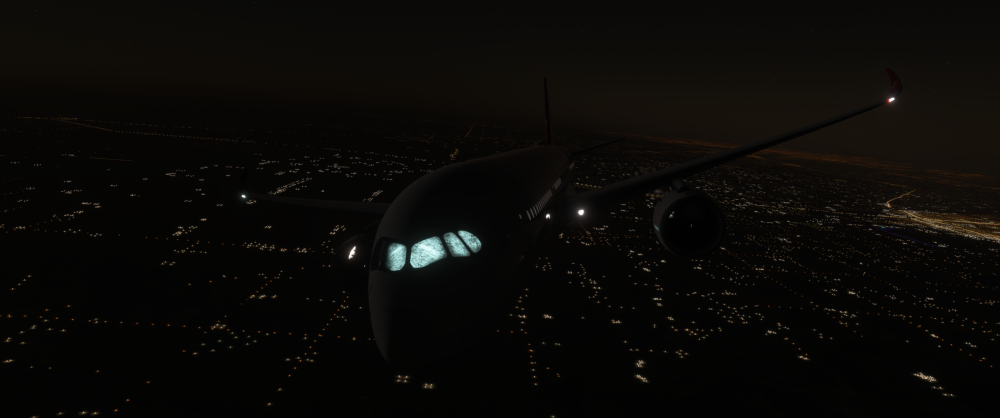
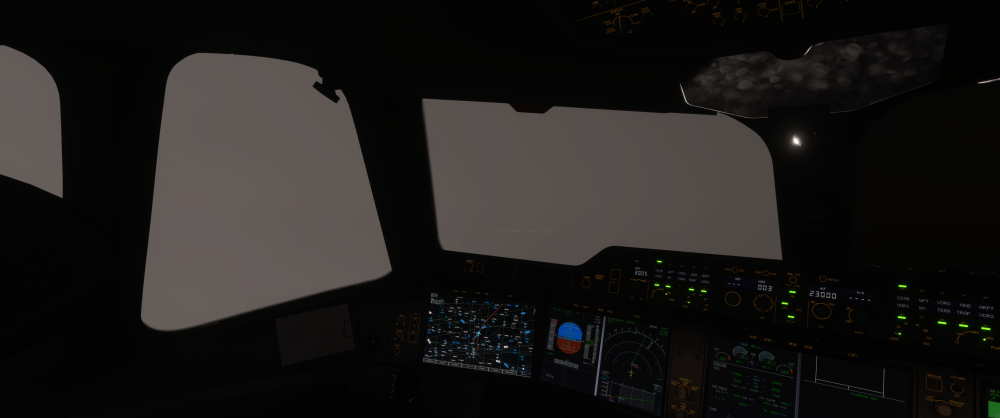
  1. Hello I have recently updated to sim update 5 and have seen a few visual bugs that I wanted to bring up. First being that on taxi out a light source randomly appeared, and then illuminated my cockpit, the cabin, and other random elements on the aircraft. It goes away / isn't visible during daylight hours. the second being bring blue colored exhaust coming from the port at the bottom of the engine during start. I have attached screenshots of the lighting issue. Other Info: A350 v1.2.5 on MSFS 2024 SU5 Specs: CPU: 7800x3d GPU: 4080 super 64gb ram
Account

Navigation

Configure browser push notifications

Chrome (Android)
  1. Tap the lock icon next to the address bar.
  2. Tap Permissions → Notifications.
  3. Adjust your preference.
Chrome (Desktop)
  1. Click the padlock icon in the address bar.
  2. Select Site settings.
  3. Find Notifications and adjust your preference.