



Skip to content
View in the app

A better way to browse. Learn more.

iniBuilds Forum

A full-screen app on your home screen with push notifications, badges and more.

To install this app on iOS and iPadOS
  1. Tap the Share icon in Safari
  2. Scroll the menu and tap Add to Home Screen.
  3. Tap Add in the top-right corner.
To install this app on Android
  1. Tap the 3-dot menu (⋮) in the top-right corner of the browser.
  2. Tap Add to Home screen or Install app.
  3. Confirm by tapping Install.

harry_yoshi

Member
  • Joined

  • Last visited

  1. Great, thank you so much for the quick reply. Best regards
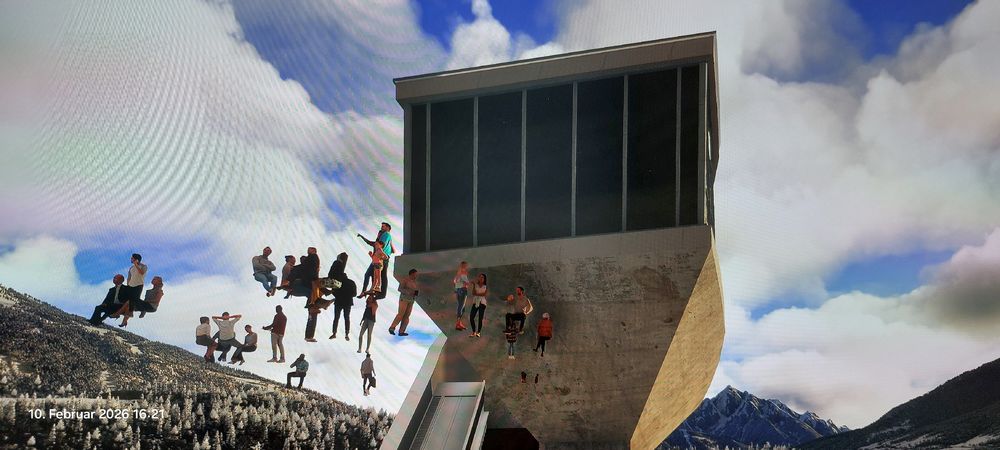
  2. Hello everyone, after the initial installation the airport worked perfectly. Now I'm having problems at the Bergisel ski jump, and the sim sometimes crashes. The animated jumper has disappeared, and there are people floating around the jump. So far, I've tried the following: - Re-downloading V1.0.3 - standard/default MSFS LOWI scenery is disabled - photogrammetry is enabled in MSFS settings - rebuilded the contend.xml file - cleared Scernery Index folder Nothing has worked so far. Perhaps someone can give me a tip. Many thanks and best regards from Germany.
Account

Navigation

Configure browser push notifications

Chrome (Android)
  1. Tap the lock icon next to the address bar.
  2. Tap Permissions → Notifications.
  3. Adjust your preference.
Chrome (Desktop)
  1. Click the padlock icon in the address bar.
  2. Select Site settings.
  3. Find Notifications and adjust your preference.