



Skip to content
View in the app

A better way to browse. Learn more.

iniBuilds Forum

A full-screen app on your home screen with push notifications, badges and more.

To install this app on iOS and iPadOS
  1. Tap the Share icon in Safari
  2. Scroll the menu and tap Add to Home Screen.
  3. Tap Add in the top-right corner.
To install this app on Android
  1. Tap the 3-dot menu (⋮) in the top-right corner of the browser.
  2. Tap Add to Home screen or Install app.
  3. Confirm by tapping Install.

Yes1234

Member
  • Joined

  • Last visited

Everything posted by Yes1234

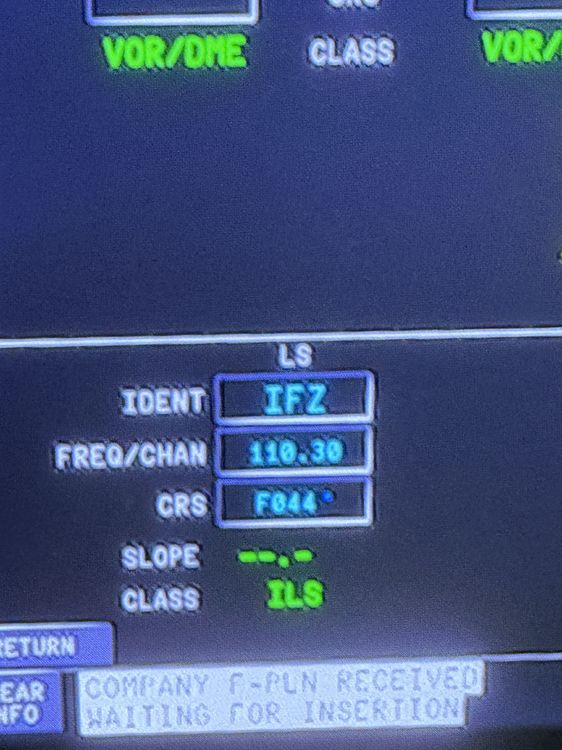
  1. I’m also having the same problem, I manually inputted the ident for cyvr ils 26L (IFZ) 110.70 and it doesn’t seem have the glideslope on the navdata page. Everytime I put a star for an ils, it puts INSQ in the ident. I’m using the Navi graph navdata on the 3rd party page but I don’t have a subscription. I’ve also tried switching my nav data to the sim defalt but it’s doesn’t change anything. I’m on the 1.20 version on Xbox. I know the frequency is wrong but the fmc didn’t allow me to change it
Account

Navigation

Configure browser push notifications

Chrome (Android)
  1. Tap the lock icon next to the address bar.
  2. Tap Permissions → Notifications.
  3. Adjust your preference.
Chrome (Desktop)
  1. Click the padlock icon in the address bar.
  2. Select Site settings.
  3. Find Notifications and adjust your preference.