



Skip to content
View in the app

A better way to browse. Learn more.

iniBuilds Forum

A full-screen app on your home screen with push notifications, badges and more.

To install this app on iOS and iPadOS
  1. Tap the Share icon in Safari
  2. Scroll the menu and tap Add to Home Screen.
  3. Tap Add in the top-right corner.
To install this app on Android
  1. Tap the 3-dot menu (⋮) in the top-right corner of the browser.
  2. Tap Add to Home screen or Install app.
  3. Confirm by tapping Install.

NavierStokes

Member
  • Joined

  • Last visited

Everything posted by NavierStokes

  1. I did some more testing to see if it is maybe user error, but I still wasn't able to get the heading bug to shop on the ND ... Am I the only one flying the A350 with FD off? 😂
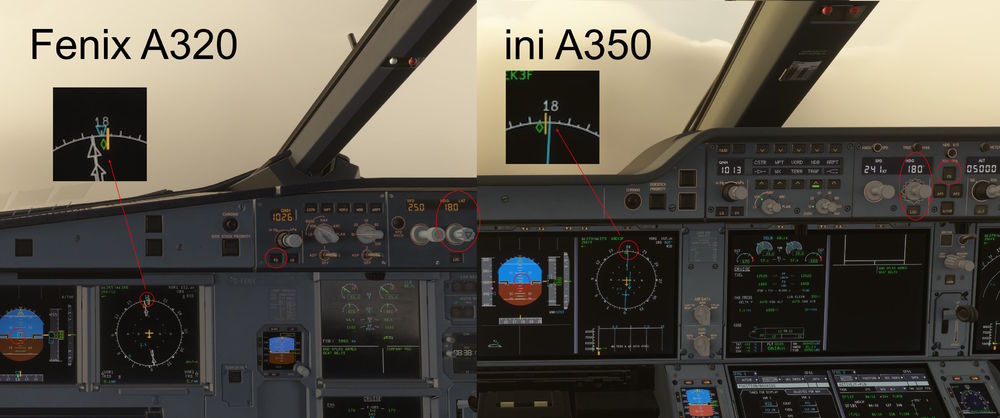
  2. When flying the A350 with FD off and pulling the heading selector no heading bug is displayed on the ND. On the PFD the heading marker is displayed correctly. The same is also true for the iniBuilds A330. In the Fenix A320 for example the heading bug is displayed correctly. Is this a buggy bug or did I miss something?
Account

Navigation

Configure browser push notifications

Chrome (Android)
  1. Tap the lock icon next to the address bar.
  2. Tap Permissions → Notifications.
  3. Adjust your preference.
Chrome (Desktop)
  1. Click the padlock icon in the address bar.
  2. Select Site settings.
  3. Find Notifications and adjust your preference.