



Skip to content
View in the app

A better way to browse. Learn more.

iniBuilds Forum

A full-screen app on your home screen with push notifications, badges and more.

To install this app on iOS and iPadOS
  1. Tap the Share icon in Safari
  2. Scroll the menu and tap Add to Home Screen.
  3. Tap Add in the top-right corner.
To install this app on Android
  1. Tap the 3-dot menu (⋮) in the top-right corner of the browser.
  2. Tap Add to Home screen or Install app.
  3. Confirm by tapping Install.

yupeitong

Member
  • Joined

  • Last visited

  1. After the 350 update to 1.1.9, the previous problems still haven't been resolved. The cabin lights can't be fully turned on; they can only be set to medium or low. We have already reported this to you many times, but it still hasn't been fixed. I hope there will be some improvements. I really like the 350 you made. I hope you have a happy life.
  2. yupeitong started following Texture loss
  3. yupeitong posted a topic in Suggestions
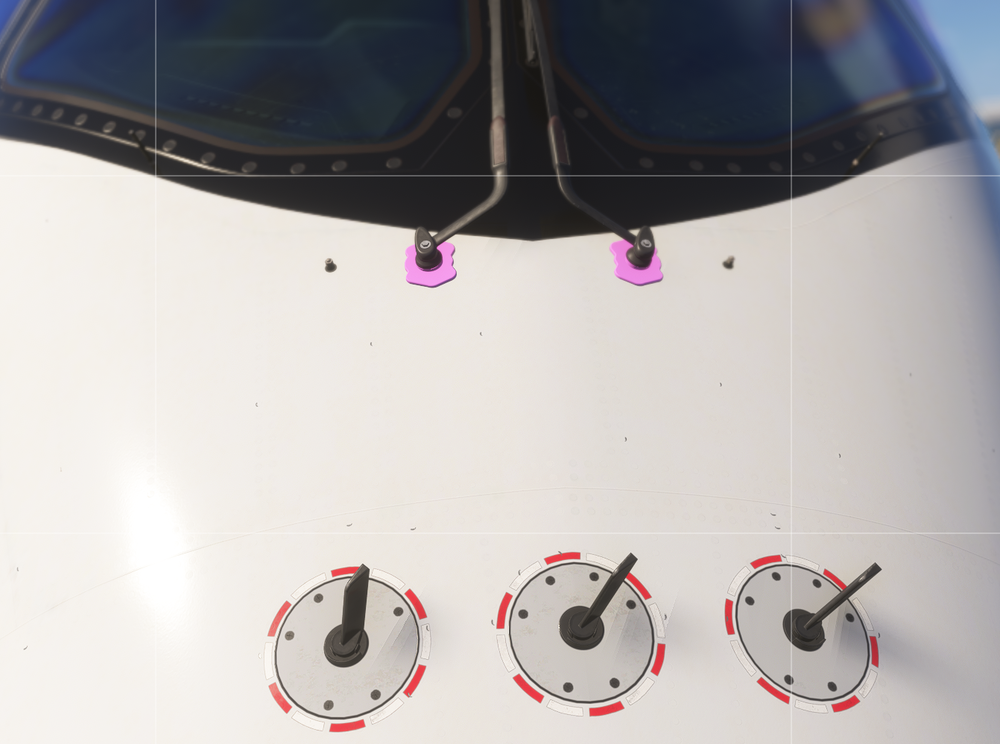
    Texture loss The color of the pads under the wiper has faded. This issue has occurred on all the planes. I have removed all the paint jobs that don't belong to this version. Currently, this is the default appearance. I hope it can be fixed. Thank you.
Account

Navigation

Configure browser push notifications

Chrome (Android)
  1. Tap the lock icon next to the address bar.
  2. Tap Permissions → Notifications.
  3. Adjust your preference.
Chrome (Desktop)
  1. Click the padlock icon in the address bar.
  2. Select Site settings.
  3. Find Notifications and adjust your preference.