Skip to content
View in the app

A better way to browse. Learn more.

iniBuilds Forum

A full-screen app on your home screen with push notifications, badges and more.

To install this app on iOS and iPadOS
  1. Tap the Share icon in Safari
  2. Scroll the menu and tap Add to Home Screen.
  3. Tap Add in the top-right corner.
To install this app on Android
  1. Tap the 3-dot menu (⋮) in the top-right corner of the browser.
  2. Tap Add to Home screen or Install app.
  3. Confirm by tapping Install.

uklee83

Member
  • Joined

  • Last visited

  1. any update on this. definitely featured in the 2020 version.
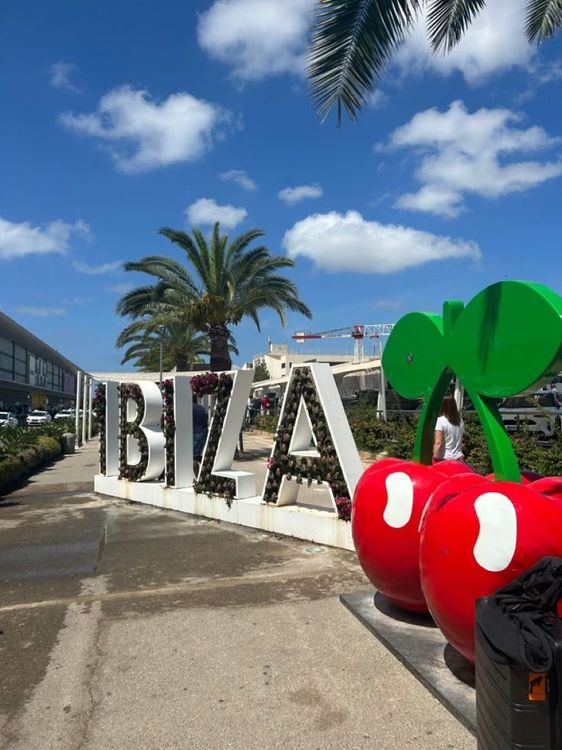
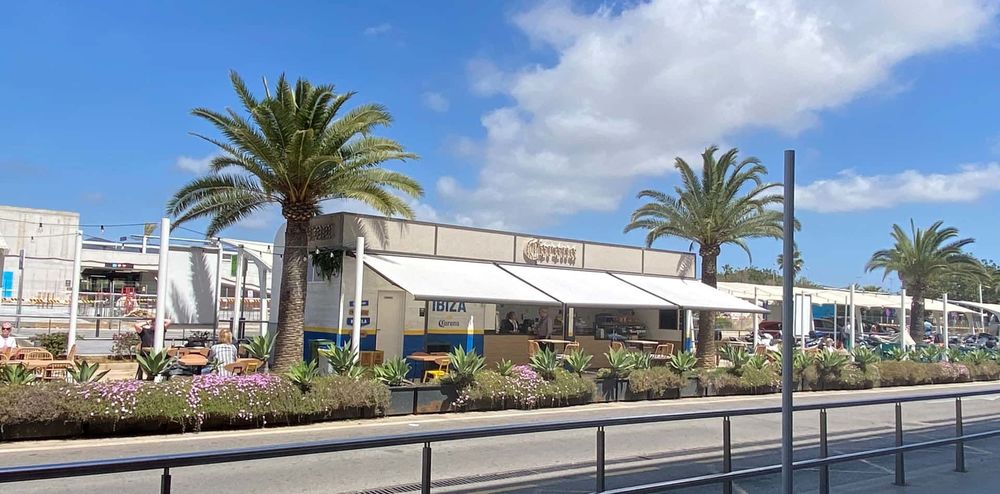
  2. I noticed the outdoor cafe and Ibiza sign was wrong when I was last in Ibiza last year. The cafe area was rebranded with Corona and the Ibiza sign has the Pacha cherries. Purchased the 2024 version in hope that these things would have been updated.
  3. I have the older version and it was in that complete with lighting
  4. Seem to be missing the DC10 club end of the runway and replaced with generic building alongside the wall other side of road now seems to be a building also.

Account

Navigation

Configure browser push notifications

Chrome (Android)
  1. Tap the lock icon next to the address bar.
  2. Tap Permissions → Notifications.
  3. Adjust your preference.
Chrome (Desktop)
  1. Click the padlock icon in the address bar.
  2. Select Site settings.
  3. Find Notifications and adjust your preference.