



Skip to content
View in the app

A better way to browse. Learn more.

iniBuilds Forum

A full-screen app on your home screen with push notifications, badges and more.

To install this app on iOS and iPadOS
  1. Tap the Share icon in Safari
  2. Scroll the menu and tap Add to Home Screen.
  3. Tap Add in the top-right corner.
To install this app on Android
  1. Tap the 3-dot menu (⋮) in the top-right corner of the browser.
  2. Tap Add to Home screen or Install app.
  3. Confirm by tapping Install.

RashNTony

Member
  • Joined

  • Last visited

Everything posted by RashNTony

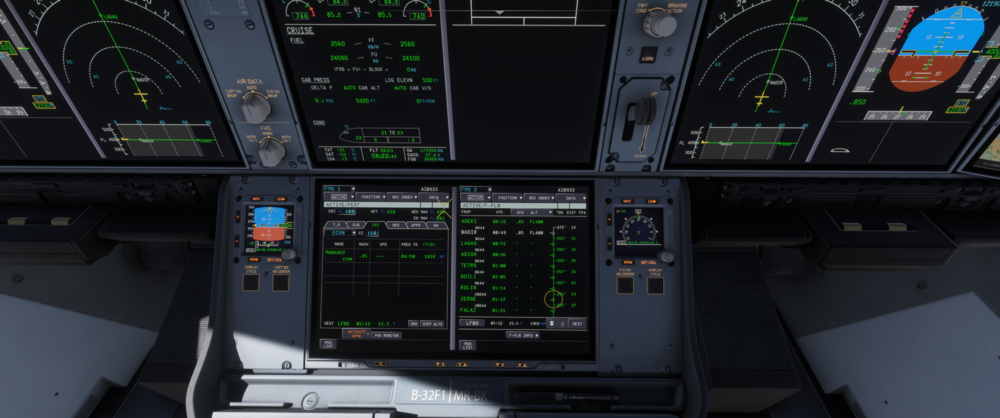
  1. Hi team, I'm reposting this bug because it hasn't been patched in v1.1.6. The FMS still shows incorrect ETE/UTC times on the F-PLN page - current time is 08:22, but waypoints ETEs shows past times, and LFBO displays ETA 05:12 which is also in the past. Would be great if the team could take a look at this. Cheers,
Account

Navigation

Configure browser push notifications

Chrome (Android)
  1. Tap the lock icon next to the address bar.
  2. Tap Permissions → Notifications.
  3. Adjust your preference.
Chrome (Desktop)
  1. Click the padlock icon in the address bar.
  2. Select Site settings.
  3. Find Notifications and adjust your preference.