Haui
Member
-
Joined
-
Last visited
-
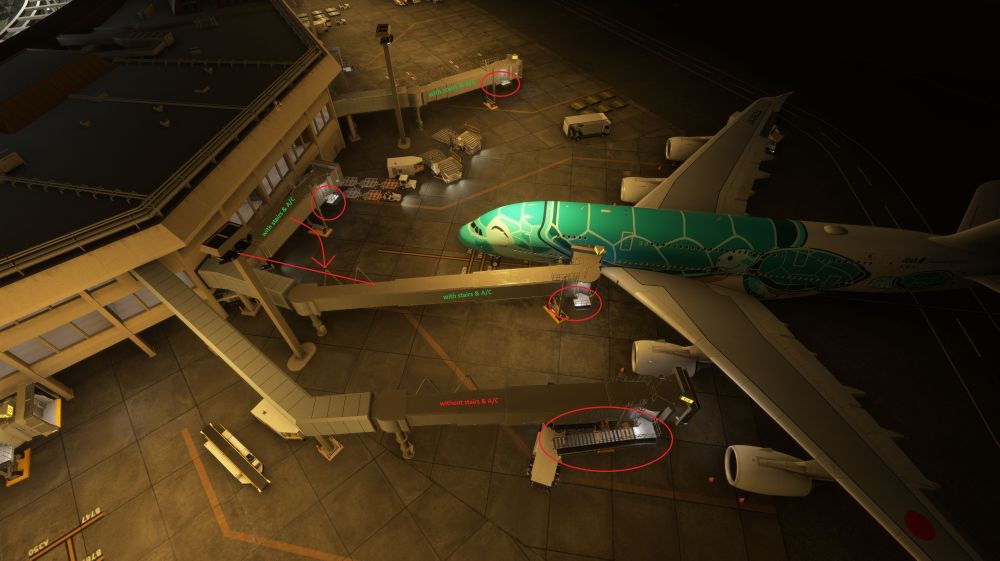
Hi Ini-Team, I'm thoroughly enjoying your A380 (Yay!) and while doing so I took it to one of my favourite airports - PHNL. There, I noticed that the A380 Gates C4 and C9 have bad jetway placements and the jetway types (with stairs and A/C as well as without) do not match the real configuration. I wanted to ask you to update/fix the jetways and A380 Gates at PHNL. It should be a quick and easy fix as there are only 2x A380 Gates and the rest is just jetway placement. Here is what I've noticed and would like for ini to fix/update: Gates C4 & C9: 1.) The first jetway (shortest one) should by aligned parallel to the A/C final position, not lateral as seen in the atached screenshot. 2.) IRL the first and second jetways have stairs and airconditioning mounted. The third (A380 specific) jetway has neither of those. In the current configuration of Ini's PHNL, it is the other way around. 3.) Please add Ini's Multi-Jetway technology to these two gates :) All other 2 Jetway Gates. 4.) Please check that the first jetways are aligned parallel and not lateral to the A/C (see point 1.). 5.) If possible, check the minimal length of retracted jetways. Especially at Gates D1, G3 & G4 the first jetways are very short IRL. Ini's seem to be almost twice as long when fully retracted. 6.) Gate D1 is missing its second jetway. Thanks again for bringing PHNL and the A380 to MSFS24! I'm looking forward to your update. Best regards, Michael