



Skip to content
View in the app

A better way to browse. Learn more.

iniBuilds Forum

A full-screen app on your home screen with push notifications, badges and more.

To install this app on iOS and iPadOS
  1. Tap the Share icon in Safari
  2. Scroll the menu and tap Add to Home Screen.
  3. Tap Add in the top-right corner.
To install this app on Android
  1. Tap the 3-dot menu (⋮) in the top-right corner of the browser.
  2. Tap Add to Home screen or Install app.
  3. Confirm by tapping Install.

Stonywolf

Member
  • Joined

  • Last visited

Everything posted by Stonywolf

  1. Stonywolf replied to Stonywolf's topic in Systems
    As mentioned before, I can't install A350. Aside from forcing it, I don't see how I could install it. If you can help me, please. Xbox Series X
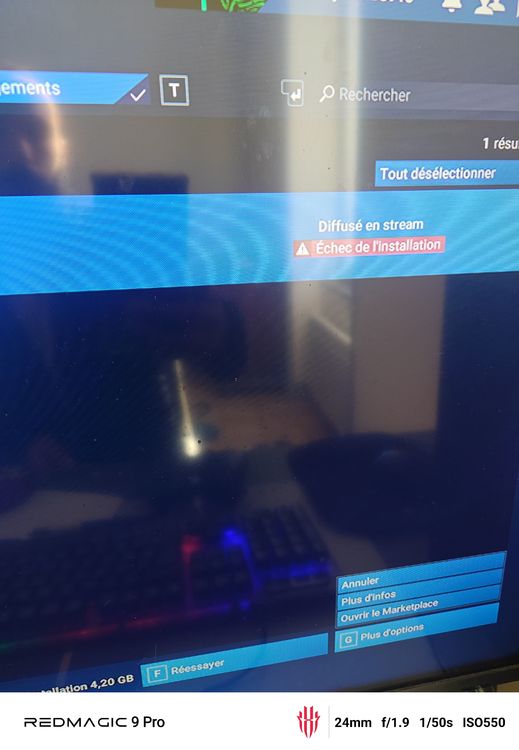
  2. Hi I'm trying to install A350 since the update and I'm having installation problems on Xbox Series X. I can't install the plane; it says "FAILURE" in red and it's streaming. What can I do?
  3. Stonywolf posted a topic in Systems
    Hello team Thanks again for the Xbox update for the A350, but I'd like to report an installation issue. And thanks again for your work 👌🏼
  4. Hello everyone! The A350 1.2.1 update is really disappointing; it's impossible to even fly for an hour without WASM. I'd like to know how to revert to the previous update. On the other hand, the A340 is fantastic and very realistic. Thank you so much for this exceptional aircraft! 😉👌🏼

Account

Navigation

Configure browser push notifications

Chrome (Android)
  1. Tap the lock icon next to the address bar.
  2. Tap Permissions → Notifications.
  3. Adjust your preference.
Chrome (Desktop)
  1. Click the padlock icon in the address bar.
  2. Select Site settings.
  3. Find Notifications and adjust your preference.