



Skip to content
View in the app

A better way to browse. Learn more.

iniBuilds Forum

A full-screen app on your home screen with push notifications, badges and more.

To install this app on iOS and iPadOS
  1. Tap the Share icon in Safari
  2. Scroll the menu and tap Add to Home Screen.
  3. Tap Add in the top-right corner.
To install this app on Android
  1. Tap the 3-dot menu (⋮) in the top-right corner of the browser.
  2. Tap Add to Home screen or Install app.
  3. Confirm by tapping Install.

ChrisJ748

Member
  • Joined

  • Last visited

  1. Afternoon Eddie, No, I don't have this issue with any other aircraft, I've just updated to V1.1.0, so I will keep tabs on it as see if it does it again.
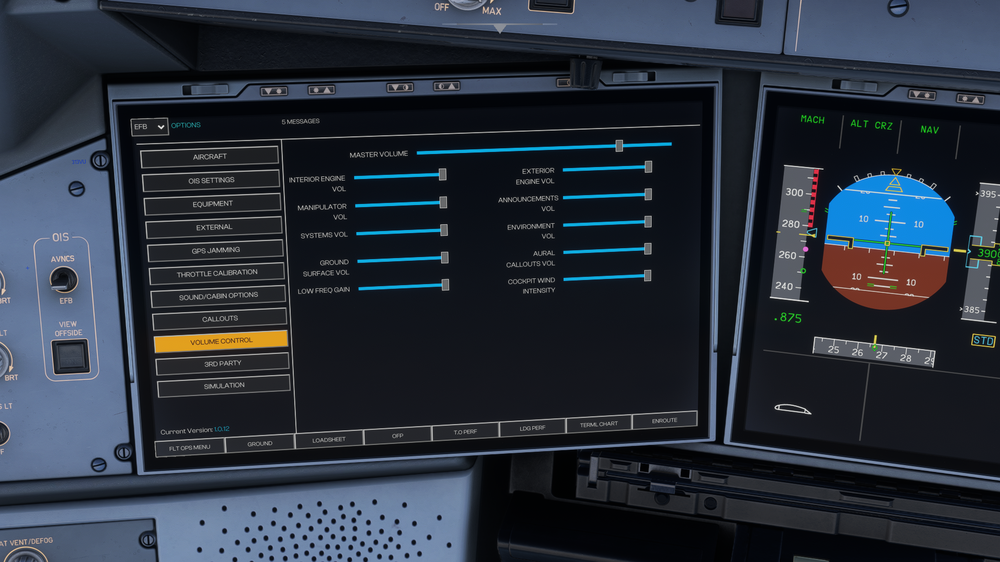
  2. Evening Eddie, thanks for your response. I don't actively use headphone simulation (having just checked, it's actually greyed out) , and all my sliders are set to default from installation as can be seen here. I will add, it's not all the time the sound disappears, my previous flight was fine. I submitted the video here as Joshua Feltimo said that you needed a video of this issue.
  3. ChrisJ748 changed their profile photo
  4. I don't have any sound in external view, I'm attaching a video link as recommended by Joshua. Currently running Version V1.0.12 in MSFS2020 inibuilds A350 No sound external view.mp4

Account

Navigation

Configure browser push notifications

Chrome (Android)
  1. Tap the lock icon next to the address bar.
  2. Tap Permissions → Notifications.
  3. Adjust your preference.
Chrome (Desktop)
  1. Click the padlock icon in the address bar.
  2. Select Site settings.
  3. Find Notifications and adjust your preference.