




FusionAC
Member
-
Joined
-
Last visited
Everything posted by FusionAC
-
I did a flight with the following options off in the MOZA software and it was much better, thanks for the advice on that. The autopilot is still a little rough which may or may not be like the real aircraft, I wouldn't know lol The only glaring issues I saw were a tendency to go into a shallow descent to recapture speed during IAS climb, and there was a bug where the EFB didn't have the option to change to Navigraph charts until later in the flight; it was just stuck on LIDO charts for the climb phase and then the option appeared. Anyway, thanks again for the advice, much more flyable now.
-
I've turned off the autopilot following on my MOZA but I'll try turning off the trim following as well. That does defeat the purpose of FFB though, since having the stick change positions based off of trim is part of the experience. Is there any way to make the aircraft just ignore the stick when autopilot is engaged?
-
I've not heard/read anything from the developers that they're even looking at the flight model or VNAV as problematic, but I am near the point of wanting my money back. The thing literally doesn't work.
-
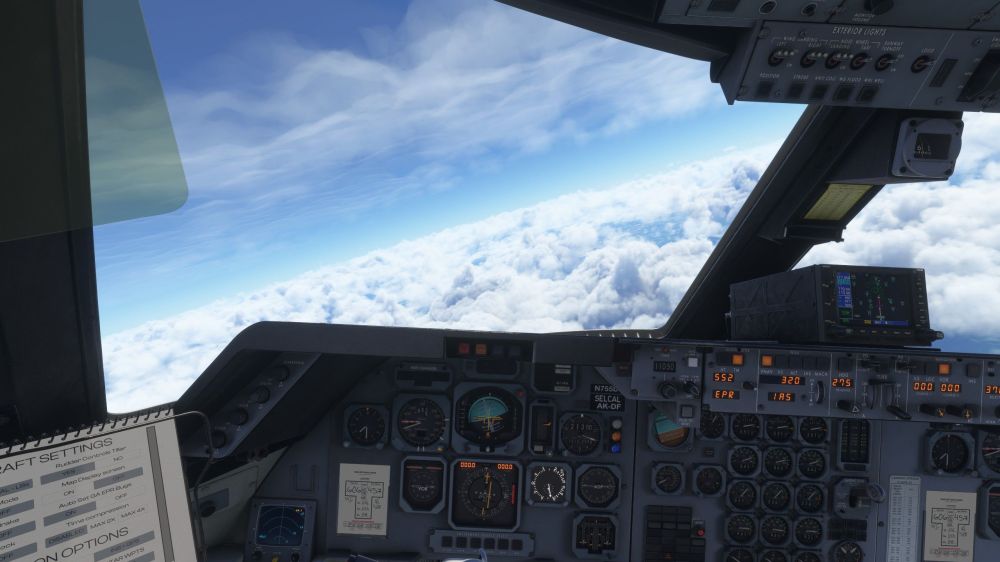
I decided to take another crack at it and see if I had messed something up, or if my moza AB9 was causing issues, but no it's not. Here's a screenshot of a 2000ft descent during the climb phase... My Moza software has all FFB trimming and autopilot following off, so it's not adding input to the aircraft while it's in autopilot.
-
I don't know how this passed testing, but on the current patch, the L1011 wildly changes the EPR on TM/VNAV climb and the aircraft will literally go into a 1000ft or greater descent during VNAV climb to catch the speed it's trying to climb at. Not only that, once the aircraft is level in cruise, it descends AND climbs anywhere from 500 to 1000 feet as it tries to maintain speed (I guess??). It literally cannot maintain level flight. Guys, this is bad. The TM mode is completely unusable.
-
This problem is still going on? Where the hell are the devs? Could someone who works on this product actually acknowledge the problem?
-
I had this exact thing happen to me tonight. I did a flight from Memphis to Chicago, and on the downwind for 27C it just died and plummeted into the city. It's like it just randomly reverted to cold and dark.

